

Client-side Authentication Bypass: 3 Real-World Pentesting Case Studies
A Synack Red Team member discovered a cross-site scripting vulnerability in SAP Concur Open.

Disclaimer: This blog contains human-written content only. The use of AI was limited to grammatical error correction.
What is a Client-Side Authentication Bypass?
Let’s say you start testing an application and realize it uses a main.js file. In this file, there are hundreds of API endpoints. You visit one endpoint, and it shows data without authentication. You try the same with 10 other endpoints and observe the same behavior. All or most API endpoints are accessible without any authentication.
The question that comes here is, how do you write a report for something like this? Do you create a separate report for each module? For each endpoint? If you send, let’s say, 10 reports for endpoints lacking authentication, the company will probably pay for one report, call it a systemic issue (which it is), and move on. If you create separate reports for separate modules, the company might pay for one module or two, and mark the other reports as systemic. Or the company might only pay for modules where significant information is leaked.
But the question is: how do you report something like this in a way that ensures the company sees the full impact of the vulnerability?
The answer is Client-side Authentication Bypass!
This happens when authentication checks exist only in client-side JavaScript rather than on the server.
Initially, I tried to add different techniques that can be used to protect routes/pages on the frontend. But as I dug through my reports, I realized every app used a different approach. Due to this, I will directly share the case studies.
3 Client-Side Authentication Bypass Case Studies
- Authentication Bypass Allows Full CRUD Operations Over All Modules
- Authentication Bypass In REDACTED Instance Allowing CRUD Access Over All Modules
- ACPV Allows To Read/Write/Update Webhooks For Inactive User
1. Authentication Bypass Allows Full CRUD Operations Over All Modules
This is one of my favorite ones. When we visit https://application/dashboard, we are redirected to a login page. Obviously, because we do not have a valid login.
I analyzed the client-side JS code to find valid routes, API endpoints, etc. I painstakingly constructed many of the API calls, and that revealed a pattern. All of them lacked authentication. I could see all users, clients, projects, resources, and more directly through the API. There were several add/remove/delete API endpoints as well, but it was taking a lot of time to reconstruct the API calls from raw JS code. And all API endpoints I tested so far lacked authentication.
This sparked a thought in me. If I could figure out how the front-end handled authentication, I could probably trick it into believing I was authenticated.
I found the following snippet:
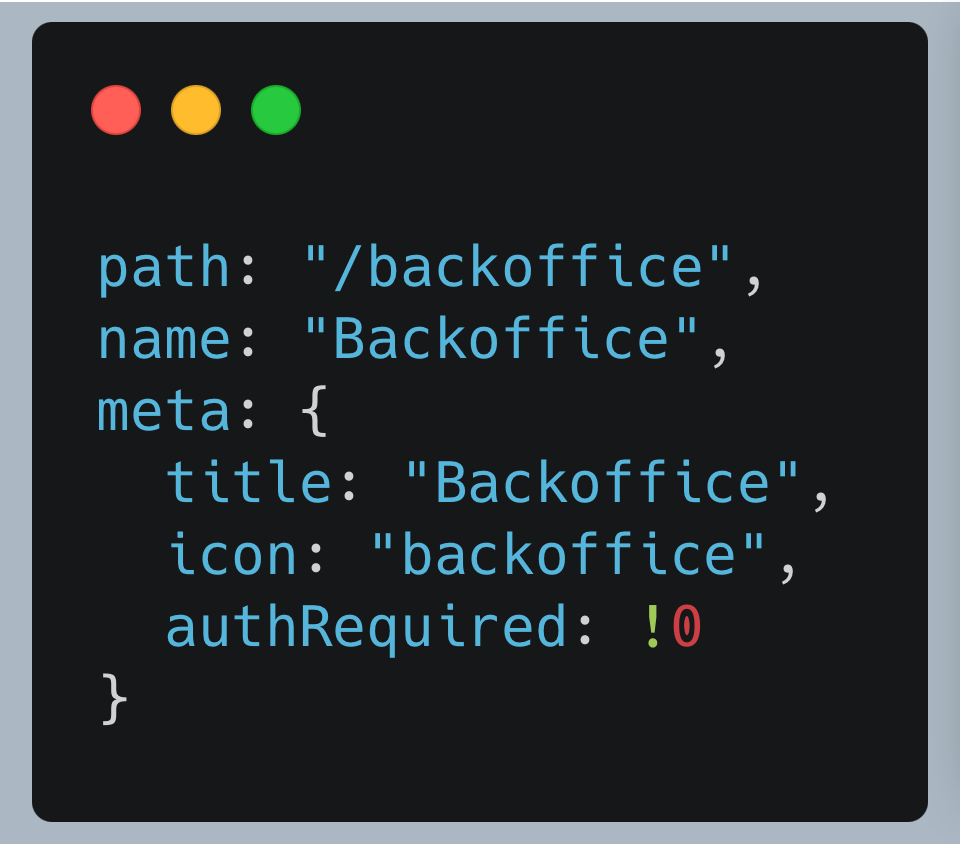
Here, the authRequired parameter is set to !0 which simply means true. In simple terms, authentication is required for the /backoffice path.
Future me could have tried authRequired:0 using Burp Suite’s match and replace rules, but I couldn’t think of this at that time.
I checked how this autheRequired check was performed and came across this:
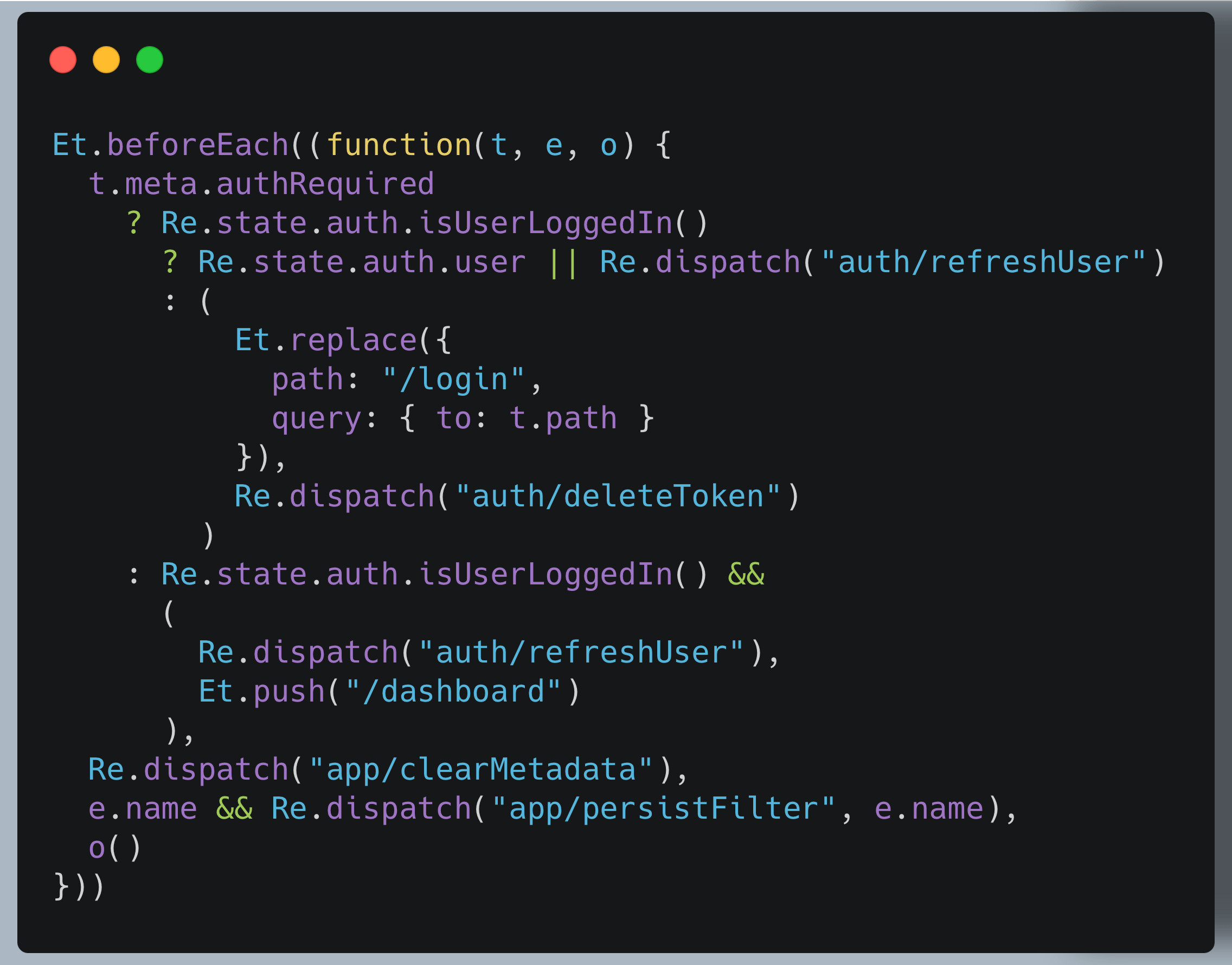
I couldn’t understand all of this, but one thing that caught my eye was the isUserLoggedIn() function.
So, I further analyzed the code to see how that function was working. The analysis led to the following snippet:
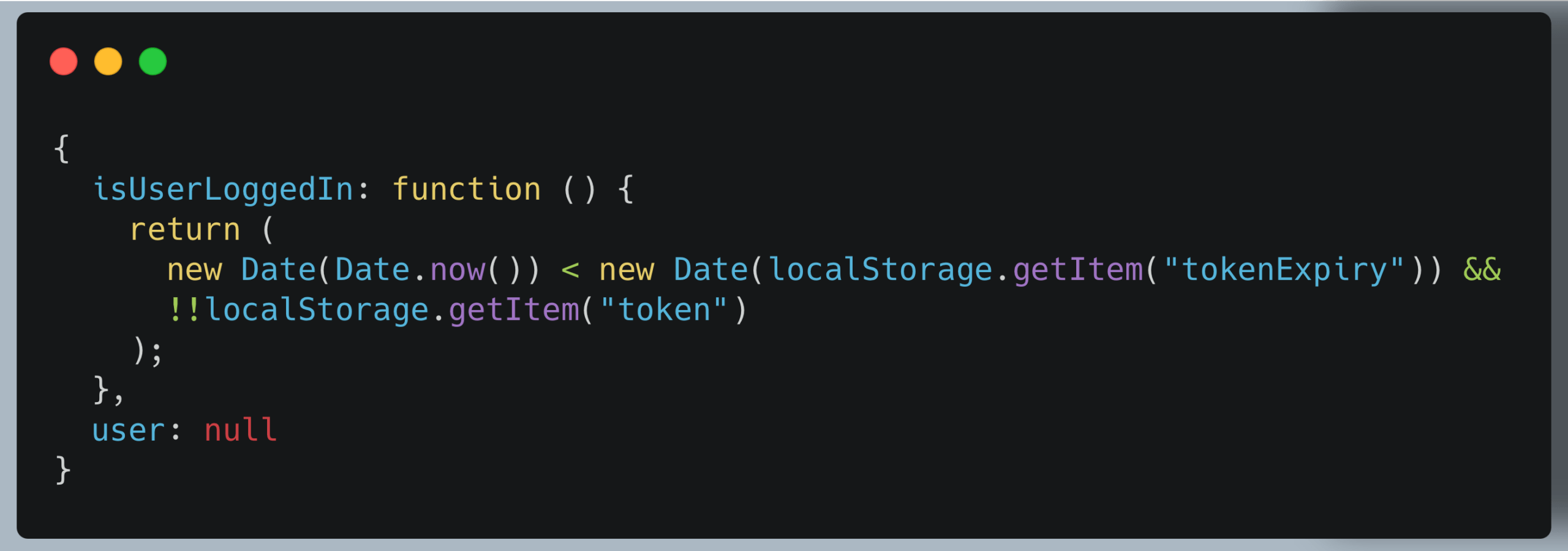
Great! So we now know that the application requires the token and tokenExpiry parameters to be set in local storage. I set an example JWT in the token parameter and a random future date in the tokenExpiry parameter and I was logged in!
How did I determine that the application was expecting a JWT in the token parameter? Using this snippet that I came across while searching for “token”:
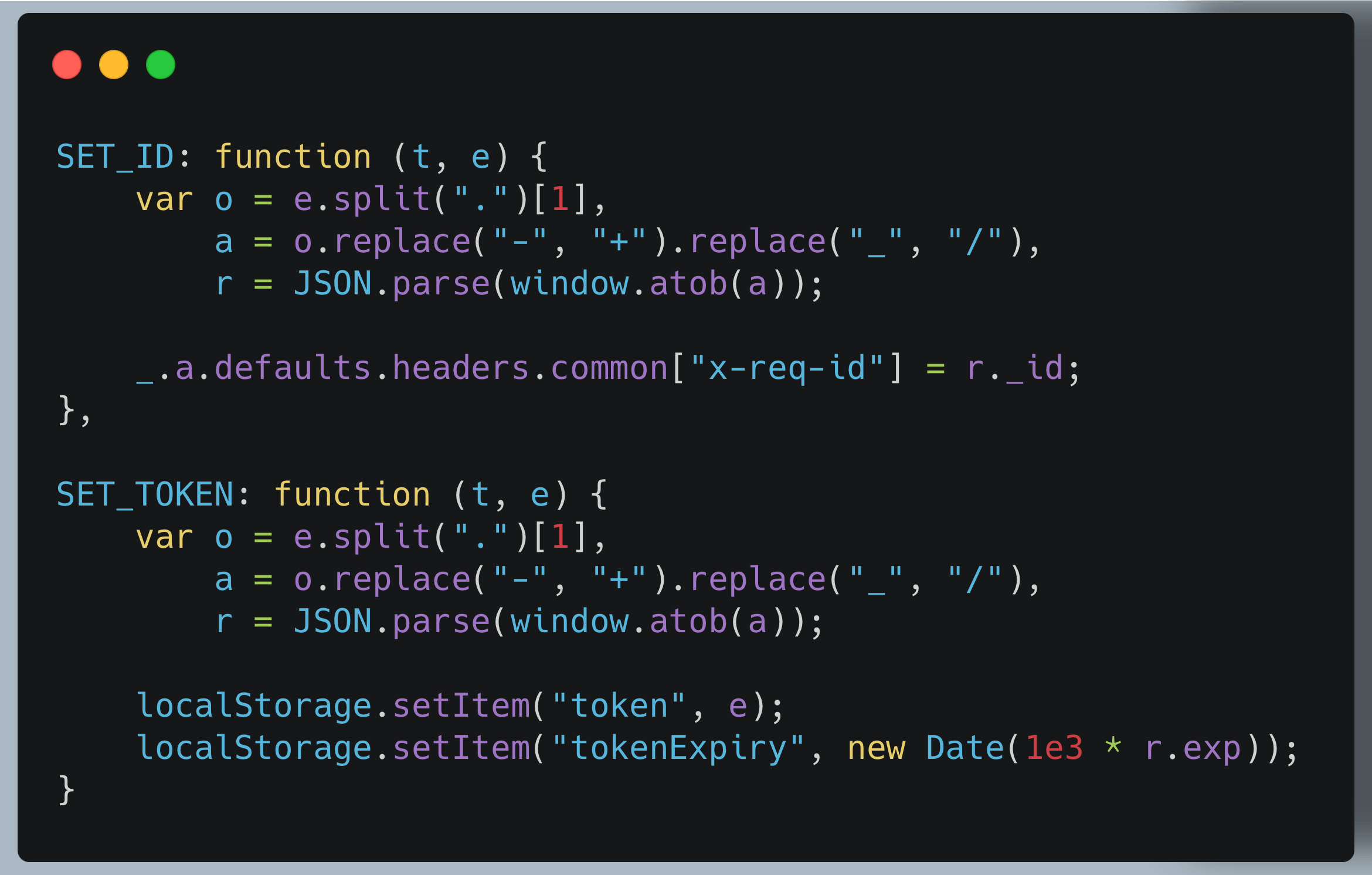
The above code decodes a JWT and sets the necessary values.
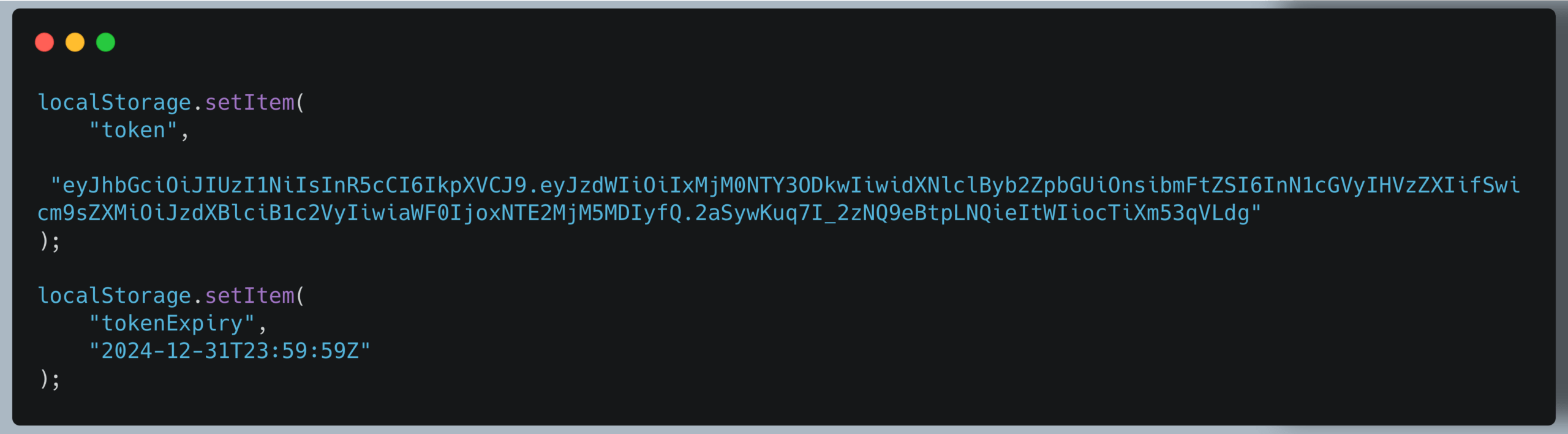
The final PoC was this:
2. Authentication Bypass In REDACTED Instance Allowing CRUD Access Over All Modules
This was also a similar case. I found the API endpoints were accessible without any authentication. And the application also felt vulnerable. So, I checked the JS files and came across this snippet:
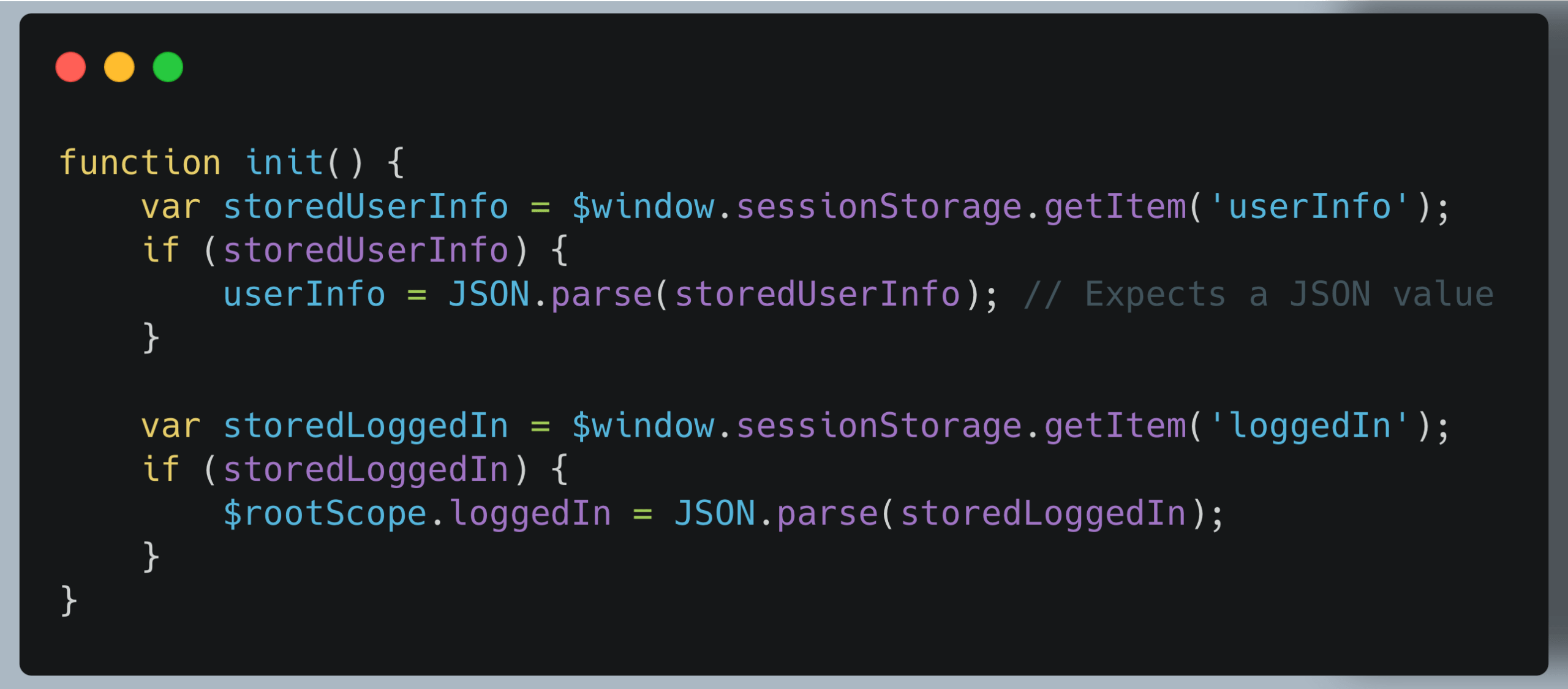
This code retrieves the user information from the userInfo and loggedIn session storage keys.
I manually set the userInfo parameter to be “synack” and loggedIn to true. However, this didn’t bypass the authentication, and we can quickly see the why. The userInfo value is supposed to contain a JSON object. And because we entered “synack”, it wasn’t valid JSON, and the check failed.
To see what exactly the application expected in the userInfo key, I looked into the JS code and found this snippet:
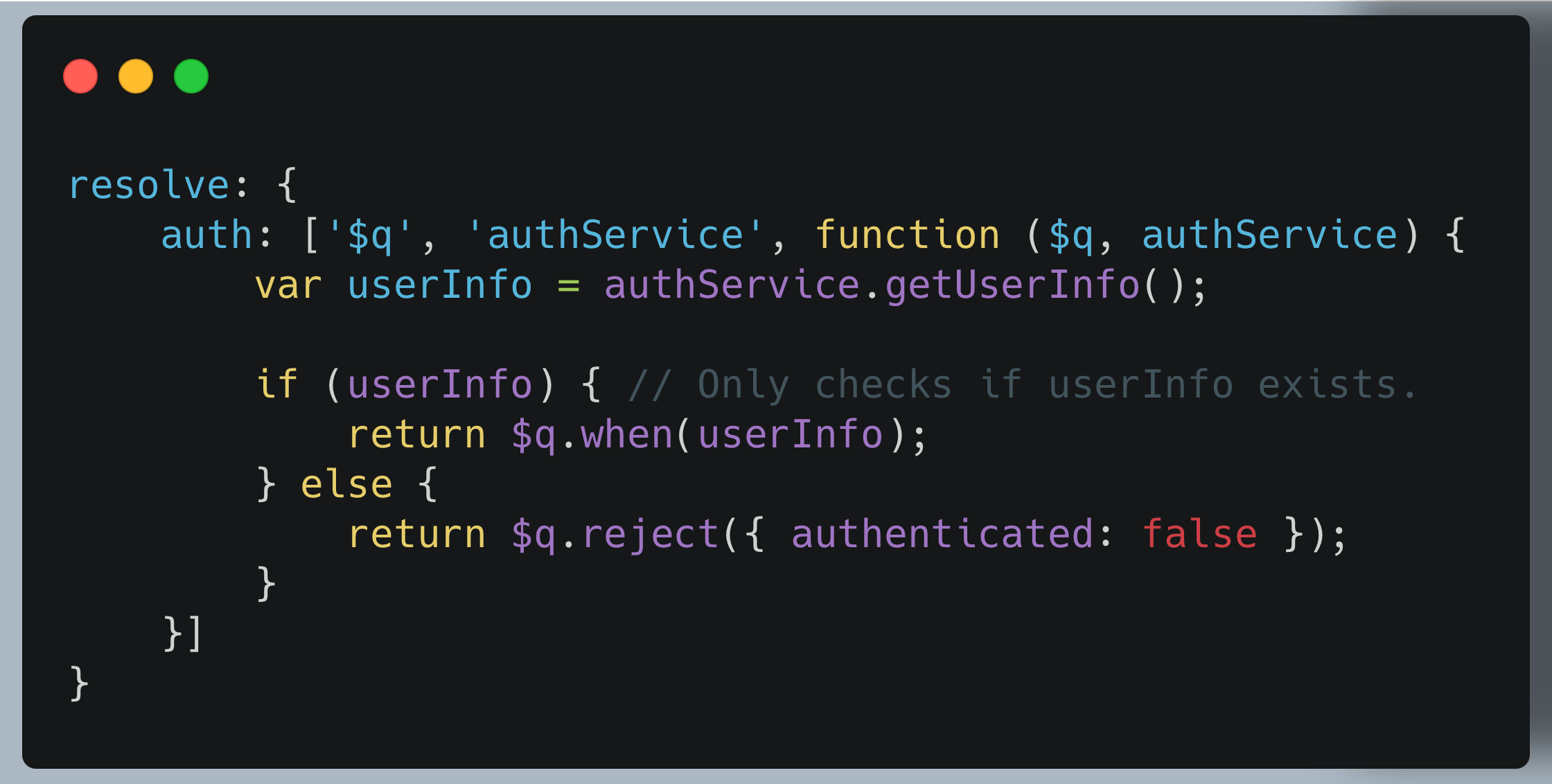
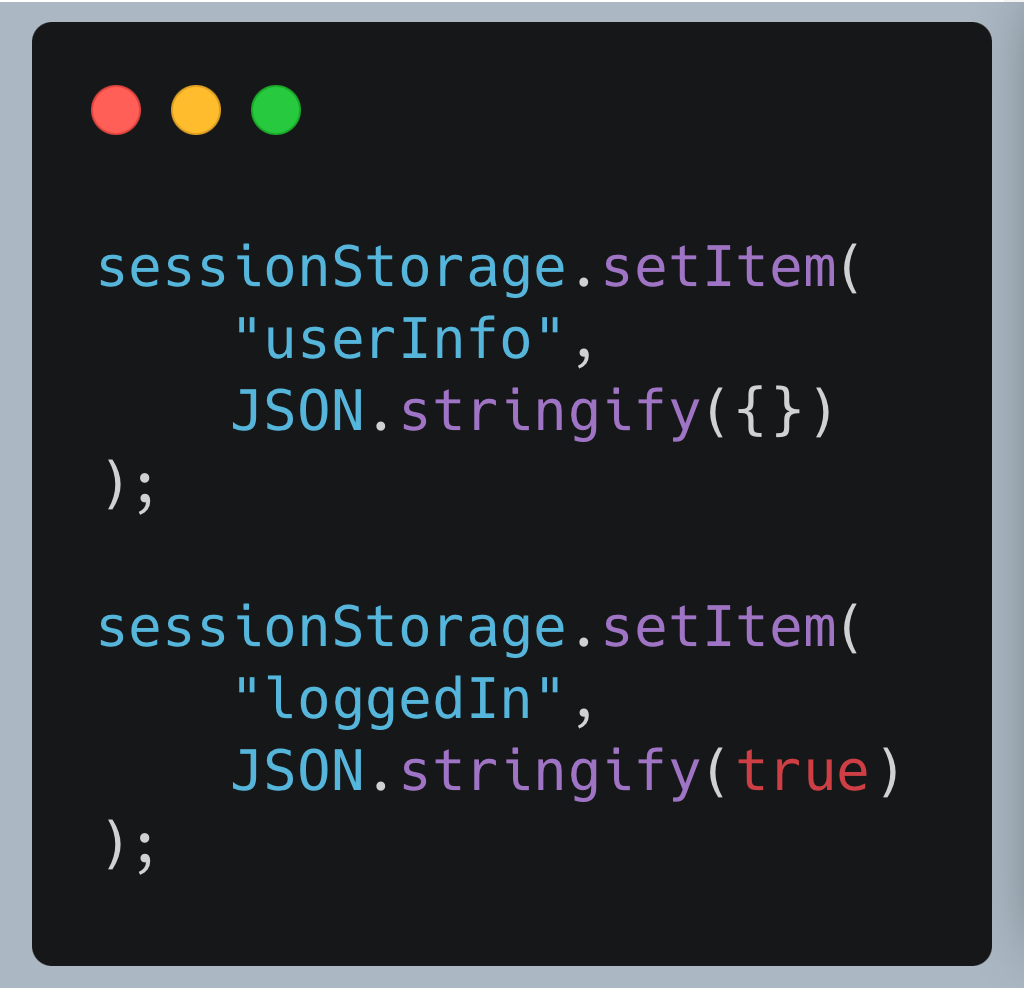
Here, the code only verifies if userInfo exists, and it is not null. It doesn’t perform any validity check on the userInfo object. This meant that we could bypass this check by simply setting the userInfo parameter to be {}. That’s it.
The final authentication bypass looked like this:
3. ACPV Allows To Read/Write/Update Webhooks For Inactive User
This was an authenticated assessment in Synack Red Team. The credentials were provided for an inactive user who has the bare minimum functionality. The user had limited read access to a few functionalities but no write access.
In the application, there was a “webhooks” functionality. The current user could see the webhooks but could not add or edit them because that functionality was hidden in the UI.
After logging in, a request to the following endpoint was sent: /areaprivada/api/payments/dashboard/v1/accounts/me. In a response to this request, there was a huge JSON object. In this JSON object, an is_active key was present. This was set to false.
This confirmed that our user was indeed a bare-minimum privileged user.
What we need to check now is that the user actually has the bare minimum privileges, and any activated user functionalities aren’t accessible. To test this, I simply changed the false to true in the is_active JSON key.
This revealed an “Add Webhook” functionality that wasn’t visible previously. I used it to create webhooks, and they were indeed created.
The takeaway from this case study is that the webhook functionality code was written in the client-side JS files. But analyzing the client-side code would have taken significantly longer than simply changing false to true.
Conclusion
I hope you had fun reading this and learned something new. If you want to practice the vulnerabilities you learned here, you can head over to https://app.barracks.army/. I have intentionally made vulnerable web applications (called WarZones) for almost all of these vulnerabilities.
One more thing. If you don’t understand the application code very well, you don’t have to get discouraged. AI tools like Claude and ChatGPT do an excellent job of analyzing the code for you. You just have to be dedicated enough to try to understand it.
If you have any doubts or questions, feel free to ping me on my LinkedIn, Twitter, Instagram, or Barracks Discord. You can also follow Synack and the Synack Red Team on LinkedIn for upcoming Exploits Explained in this series.
Happy hacking!
Frequently Asked Questions
What is client-side authentication bypass?
Client-side authentication bypass is a vulnerability where the application enforces authentication checks only in browser-side JavaScript instead of on the server. Because the logic lives in code the user controls, an attacker can manipulate local storage values, session storage flags, route guards, or JavaScript variables to convince the front end they are logged in, then call back-end API endpoints that never required authentication in the first place. As the case studies in this blog show, this can look like setting a forged JWT and expiry in localStorage, flipping a loggedIn flag in sessionStorage, or toggling an is_active value from false to true to unlock hidden functionality. The root cause is the same in every case: trust placed in the client.
What is the difference between authentication and authorization?
Authentication answers the question “who are you?” It is the process of verifying a user’s identity, typically through credentials, tokens, or session data. Authorization answers the question “what are you allowed to do?” It governs whether an authenticated user has permission to access a specific resource or perform a specific action. The two are related but distinct, and they fail in different ways. The first two case studies in this blog are authentication bypasses, the application could not verify identity at all on the server. The third case study sits closer to a broken authorization issue, the user was authenticated but should not have had access to webhook functionality reserved for active accounts. Both classes of flaw stem from the same underlying mistake: enforcing security decisions in the client rather than the server.
Could automated scanners catch this type of vulnerability?
Almost never, and this is exactly where automated tools fall short. Scanners are designed to send payloads and pattern-match responses. They are not built to read an application’s JavaScript, reverse-engineer how a route guard works, identify that an authRequired flag is being checked client-side, or reason about what value an application expects in a userInfo object. Catching a client-side authentication bypass requires a human researcher to analyze the front-end code, recognize the authentication logic, hypothesize how to trick it, and craft a working proof of concept.
About the Author
Kuldeep Pandya is an elite security researcher, bug bounty hunter, and entrepreneur with deep expertise in advanced web application pentesting. As the Co-founder and CTO of Barracks Technologies, Kuldeep’s research has covered server-side request forgery, NoSQL injection, path traversal and local file inclusion, and emerging LLM and AI vulnerabilities, including OWASP Top 10 for LLM findings demonstrated against production chatbot interfaces. Kuldeep is a longtime member of the Synack Red Team, where he has reached Level 0x05, earned a place in Synack’s Circle of Trust, and was inducted into the Synack Acropolis program in 2021. He also serves as the official Synack Red Team Envoy for India, mentoring the next generation of researchers across the region. Kuldeep has a Bachelor of Engineering – BE, Information Technology and is ASCP-certified.
What would 1,500
elite hackers find in
your stack?
The Synack Red Team and Sara AI Pentesting work side by side to test your environment and find vulnerabilities that matter.