

Stored XSS in Email Fields: How a Plus Sign Became a Full Attack Vector
During a Synack engagement, an SRT researcher found that the email field's plus-sign subaddressing syntax let an XSS payload slip past client-side validation and store unencoded on an unauthenticated invitation page.

Technical Summary
Exploits Explained
An SRT researcher identified a stored cross-site scripting (XSS) vulnerability on the unauthenticated invitation page of a content management platform. The application's email field honors RFC 5322 plus-sign subaddressing, which let an XSS payload riding in the subaddress tag (e.g., user+<payload>@domain.com) pass through unnoticed.
Two validation layers failed to catch it. Client-side format checks were bypassed entirely using an intercepting proxy. The server-side regex confirmed only structural validity (an @ symbol, a plausible domain) without inspecting the subaddress content, so it accepted the payload as a legitimate tag.
The poisoned email address was stored unencoded and later rendered, without output encoding, on the public artist invitation page generated when the affected account invited another user to connect. Because that page requires no authentication, any invitation recipient, regardless of email provider, triggered the payload simply by opening the link.
Output encoding on that one field, escaping < and > before rendering, would have neutralized the payload despite the upstream validation gaps.
The Thing About Email Fields
Nobody tests email fields seriously. They’re structured, they have known validation, and there’s this unspoken assumption that an email address can’t really be dangerous. Developers think this. Pentesters think this too, honestly. I definitely did until this happened.
But here’s something most people forget: the email spec (RFC 5321) inherits the atext definition (RFC 5322), which allows a + character in the local part for subaddress tagging. You’ve probably used this yourself. Send something to [email protected] and it still hits your inbox. Gmail, Outlook, most providers support it.
The catch is that most applications store the full address including everything after the +. They save it to the database exactly as you typed it. And then they render it back somewhere on a page without thinking twice about what’s actually inside that string.
What I Did
Two parts to this. First, poisoning my own account. Second, delivering it to victims through a completely clean invitation.
Part 1: Poisoning the Email Field
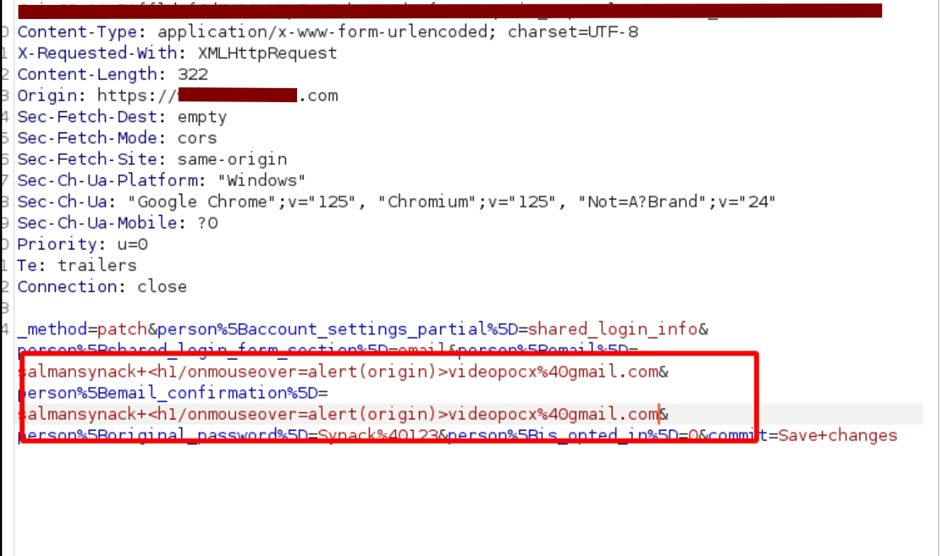
The app was a content platform where artists manage profiles, releases, and account settings. Under account settings there’s an email field with an edit button. I clicked edit, entered a valid email, turned on Burp intercept, and hit save. In Burp I swapped both the email and confirmation parameters with:
salman+<h1/onmouseover=alert(origin)>[email protected]
The front-end validation had already passed because Burp catches the request after the browser is done with it. The server accepted it.
Part 2: Delivering It to Victims
Now it was time to deliver it to another user (obviously, my own) and prove impact. Since my profile email was already poisoned, I looked for a feature that would render it to someone else and found a “request another artist to connect” option. It asked for an email address. I entered a normal, clean victim email. No payload. Just a regular address. Hit send.
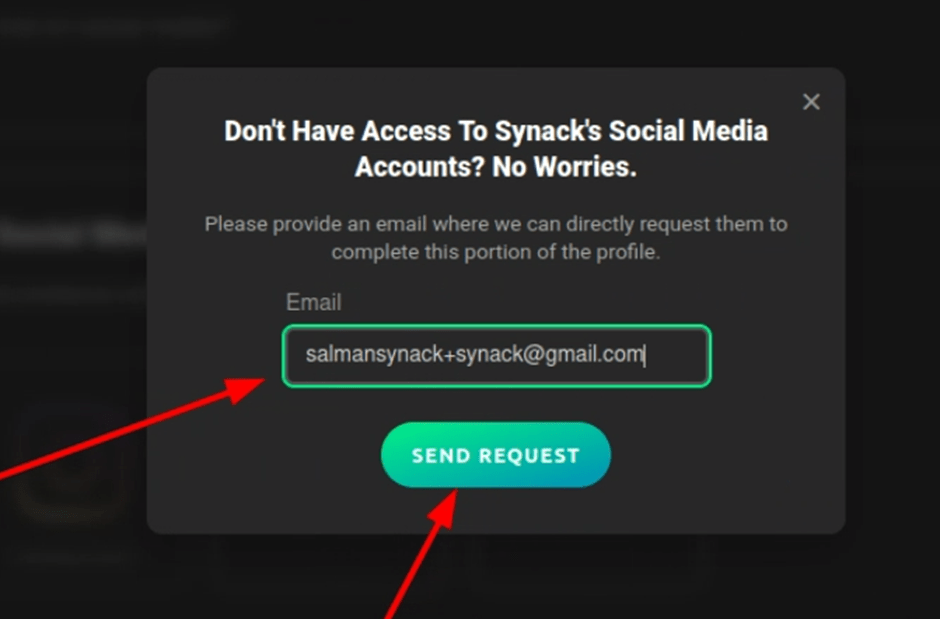
The victim received a normal invitation email with a link containing an ID and key parameter. Nothing suspicious about the email itself.
But when the victim clicks that link, the invitation page renders the inviting user’s profile. My profile. With my poisoned email sitting in the HTML, completely unencoded. The victim opens a clean link, sees what looks like a normal profile page, and the XSS fires the moment their mouse passes over the email area.
Opened the link in incognito to confirm. alert(origin) popped immediately on mouseover.
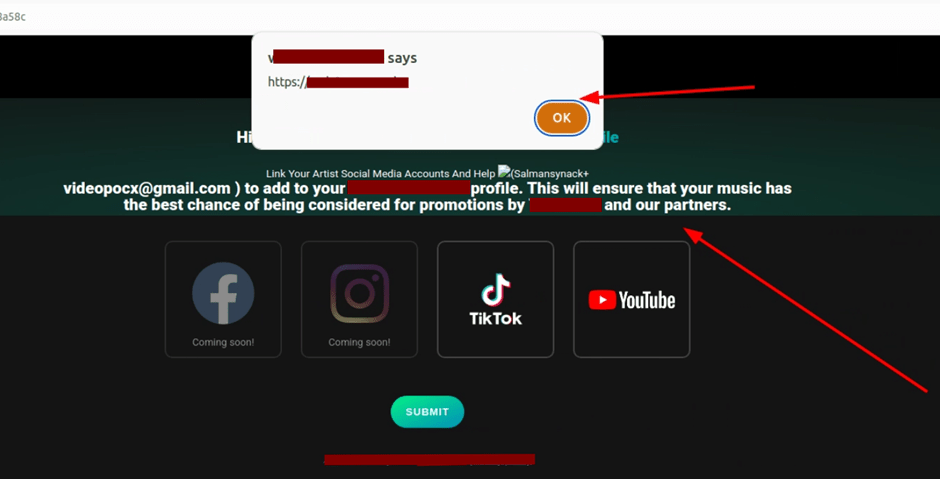
Stored XSS from an email field.
Why It was Worse Than a Normal Stored XSS
The invitation page didn’t require authentication. No login. No account. No session. Just a URL that anyone could open. And since the invitation could be sent to any valid email address, every email provider was directly affected. Gmail, Outlook, Yahoo, corporate mail – didn’t matter. Whoever opened the link got hit.
So the attack chain is: I create an account, inject the payload into my own email, set up an artist profile, then use the social linking feature to send clean invitation emails to any address I want. The victim receives a normal invitation. They click the link. The page renders my profile with the payload. They get hit. The victim’s email never contains the payload. They have no way to know anything is wrong until their browser is already executing my JavaScript.
Swap alert(origin) for actual malicious code – session hijacking, credential harvesting, phishing overlays – and you’ve basically got a watering hole attack built from a profile settings page. The attacker controls the payload and the distribution. The victim doesn’t need to do anything except click a link.
Three Defenses That all Failed
The annoying part is this should have been caught at multiple layers.
The client-side validation checked email format but only in the browser. Burp bypasses that in about two seconds. This is not security. It never was. I don’t know why we’re still having this conversation in 2026.
The server-side regex checked for structural correctness – does it have an @, does the domain look real – but never inspected the subaddress content for anything dangerous. It saw +<h1/onmouseover=alert(origin)> and basically went “yep, that’s a subaddress tag, we’re good.” Technically the + is valid. The HTML payload riding along with it was not something the regex was built to catch.
And then the output. No encoding. Nothing. The app just dumped the raw email string into the page HTML and let the browser interpret it. If they’d just encoded < as < and > as > on output, none of this would have worked. One line of code in the template. That’s all it would have taken.
How I Got Here in the First Place
I want to be honest about this because I think it matters for other researchers. I didn’t find this through some brilliant methodology or deep RFC analysis. I found it because I was bored and had 20 minutes left.
I’d read something months ago about edge cases in email parsing – can’t even remember where – and the plus-subaddressing trick was just sitting in the back of my head. When the first standard XSS attempt in the email field got rejected by the front-end, most people would’ve moved on. I almost did. But I thought, what if I use the plus trick and bypass client-side with Burp?
Two minutes later I had stored XSS on an unauthenticated page.
The boring fields are where the good bugs live. Everyone hammers the rich text editor and the file upload. Nobody looks twice at the email field because it feels safe. That assumption is exactly why this vulnerability existed across three layers of defense.
The Real Takeaway
I almost didn’t test this field. I almost quit for the day. Twenty minutes of “might as well try” produced a high-severity finding that affected every visitor to an unauthenticated page.
Test the boring stuff. Especially the boring stuff.
Thanks for reading. To learn more about the global community of researchers uncovering vulnerabilities like this, check out the Synack Red Team. Be sure to follow Synack and the Synack Red Team on LinkedIn for upcoming blogs in the Exploits Explained series.
About the Author
Salman Khan is a security researcher on the Synack Red Team. His work spans web, API, host, and mobile application penetration testing, with additional research into AI/ML security. He holds the OSCP, OSCP+, and is a Certified AI/ML Pentester (C-AI/MLPen). As a longtime SRT member, Salman was inducted into the Synack Acropolis program in 2023.
Frequently Asked Questions
Email subaddressing lets users add a tag after a “+” in the local part of an address (for example, [email protected]) while mail still reaches the same inbox. Most validation logic treats this as a harmless, spec-compliant string, so testers and developers alike tend to skip it. That assumption is exactly what allowed an XSS payload to ride through validation disguised as a subaddress tag.
The payload was stored in the researcher’s own profile, then delivered through a “connect” invitation feature that rendered the inviting user’s profile to anyone who clicked the link, no login required. Because the invitation page itself needed no authentication, the stored payload could fire against any recipient who opened it, turning one poisoned profile field into a watering hole for every clicked link.
The fix doesn’t require rewriting validation logic, it requires proper output encoding. Even though the payload passed both client-side and server-side checks, encoding characters like < and > on output (converting them to < and >) would have neutralized it regardless of what was stored in the database.
What would 1,500
elite hackers find in
your stack?
The Synack Red Team and Sara AI Pentesting work side by side to test your environment and find vulnerabilities that matter.