

How Synack's AI Asset Scoping Bot Saves Time to Test
In today’s fast-paced digital world, security teams don’t have the luxury of waiting to start a pentest. With traditional methods, delays are all too common and can leave organizations prone to malicious activity. At Synack, we’re taking advantage of the benefits of AI to help…
Overview
In today’s fast-paced digital world, security teams don’t have the luxury of waiting to start a pentest. With traditional methods, delays are all too common and can leave organizations prone to malicious activity. At Synack, we’re taking advantage of the benefits of AI to help organizations launch tests even faster and more efficiently than ever.
Synack Senior Product Manager Brandon Torio discusses the benefits of our new AI Asset Scoping Bot. Through the Synack PTaaS platform, customers can use our bot with the click of a button to determine whether host assets are in a good state for testing, providing AI-powered insights and highlighting whether there are any open ports or firewalls that could delay a test.
Full transcript
Read transcript
Hey, everyone. My name is Brandon Torio, senior product manager here at Synack, and I'm excited to share a new AI feature that just rolled out into the Synack platform. One of our advantages has always been helping you get tests started more quickly and efficiently. With the traditional pen testing engagement, you're really just emailing back and forth with the consultancy about starting the test, and then you also have to wait until the end of the test to get your results via PDF. Here with the Cine platform and it being done through a SaaS platform or a pen testing as a service platform, you can submit your own information through the
platform to start the test much more quickly and efficiently. And then once the test has started, you get results in real time. And one of our AI features specifically has been rolled out to help you get testing started even more efficiently and quickly. So I'm gonna demo that now here in the platform. I'm on our assessments page, which is where you manage the assessments you create in the platform. An assessment is just a group of assets that are meaningful to you. For example, you might do a pen test activity on your public facing web apps, on your internal host infrastructure,
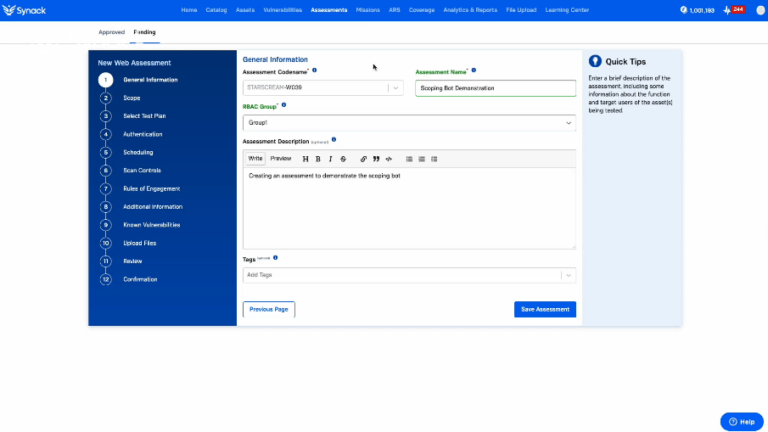
a group of APIs. We also have an assessment to represent a managed vulnerability disclosure program if you have that with us. So something you might do is acquire a new company, and you wanna pen test a group of their internal host. Right? So you can go here, and you can create an assessment, and you can choose host type testing. You You can go next. Give it a code name for the platform for security reasons, of course. And maybe you do something like, give it a name of m and a host.
Give it a role based access control group to make sure that the right team can manage it. And then tell us a little bit about it and say that, you know, this, this is a test of our new internal host. Maybe you tell us that it's for compliance reasons. You plan to test it quarterly. You just rolled out a new feature on your web app if there's a if it's web app testing. The more information you give us, the the better the test usually is. Then you give us a scope, which can be IPs, deciders, or you can give us cloud credentials to give us
credentials defined by or a scope defined by that cloud space. But here, we already have some example hosts in here, just the eight dot eight dot eight dot eight. You could type in more here in the product, but I'm gonna just stick with that for now. And here is the new AI feature. So what we've added is an asset reachability scan. You can imagine that a lot of customers come to us with numerous hosts they're trying to test, or a complex web app they're trying to test, and they submit it. But then it turns out that half the host don't really have any ports open,
or perhaps a firewall is blocking Synack from doing testing most effectively, or some of the hosts are just completely down. And so what we've done is we've added an AI reachability scanner that you can press on demand, and this performs an assessment to see if the hosts are in a good state for Synack testing. This saves us a lot of time because instead of you submitting it and then us manually performing the check and then having to notify you via email or outside of the platform that something is amiss, that some of the hosts are down,
or perhaps just there's not a lot of targets to test here. There's only really one host with one port open. You can assess that for yourself with an LLM generated report. So if I continue to move through the ACW experience here, the assessment creation experience, then I can do things like select the test plan. Do I want SYNNEX year round SYNNEX three sixty five or fourteen day test? I can select what I what I want. I can select the the start date that I want for, for the test to begin.
So after I've selected a plan type, you can go here and select a start date. As I move through the ACW experience, I can go here, and, eventually, I will get down to the review step after I submit additional relevant information like known vulnerabilities or modifications to the roles of engagement. And I got down here to the review step, and here's where you can see the output of that LLM AI powered scoping bot as we call it. So here at the bottom, you can see that the host the host that was entered,
you can see the scan results. So it tells you how many assets were identified, how many were up, how many were down, information about the checks that we performed, categorization of the assets. And this is all AI powered, and it's being done for you. So by the time you complete the form and you get down here, you already have that assessment that traditionally we might have to reach out about a bit later. You already have that assessment saying, hey. Here's what we found. Here are the ports that are open. Here's what we think about the test. We recommend that you white list us on your firewall.
We see that the test is rather small. It only has one host in it, or we see, you know, you have two hundred hosts up and you have all these ports open. And then it gives you an idea of, you know, what researchers are going to actually see once a test begins. So this is just one feature that Synack has now rolled out into the platform using AI to make things more efficient. We are definitely aiming to use AI in Copilot like styles to help you maximize your efficiency and speed in getting tests started, getting test results, outputting reports,
understanding vulnerabilities, any use case you can think about in the platform we're pretty much working on. This is just something that has rolled out recently we're very proud of and is hopefully making your testing submission that much more smooth. So if you're interested in trying this out or learning more about the SYNAC pen testing as a service platform in general, be sure to contact us on our website, and we'll reach out shortly. And thanks for watching.
No lines match that search.
Speakers
Synack
Senior Product Manager
Watch next
 5 min Jun 18, 2025 AI and Shrinking Workforces: New Realities in Cybersecurity In an evolving cyber landscape, the DoD faces significant challenges: shrinking teams, expanding attack surfaces, and the dual impact of AI. Synack's SVP, Katie Bowen, details… Katie Bowen Synack 5 min watch
  19 min May 14, 2025 AI vs. AI: The Future of Cybersecurity Will Move Faster Than Humans React Generative AI is embedded in our everyday lives, both personally and professionally. However, one thing remains clear: autonomous AI will soon dominate cybersecurity. To prepare for… Mark Kuhr Synack 19 min watch
  2 min Mar 6, 2025 Synack’s AI-powered Scoping Bot Scoping a penetration test can be a major pain point for security teams. It can take anywhere from a few days to a week. Synack’s AI-powered… 2 min watch
 Next step
Run the test instead of evaluating the idea.
Define a scope, run a Sara AI pentest against it, and see which findings are confirmed as real and exploitable. Then compare that with what your current testing returns.