


Using AI to Test CAN/UDS: When MCP Meets Cars
An AI coding agent wired into a car's CAN bus and UDS diagnostic protocol via MCP uncovers a SecurityAccess seed-key bypass on a simulated in-vehicle network. Synack Red Team researcher Manh Nguyen Dinh walks through the setup, the finding, and why this kind of testing has to start on a simulator, not a live vehicle.

Technical Summary
Exploits Explained
When testing a simulated CAN/UDS network, an AI coding agent (Claude Code) was tasked with probing the SecurityAccess (service 0x27) challenge-response mechanism on an ECU rather than accepting an initial "no duplicate seed" result at face value. Pushed to reverse-engineer the seed-key algorithm instead of only checking for seed repetition, the agent determined that the key is simply the seed's bitwise complement (key = seed XOR 0xFF).
This means the key can be computed instantly from any observed seed with a single bitwise operation, with no need to brute-force the 256 possible key values.
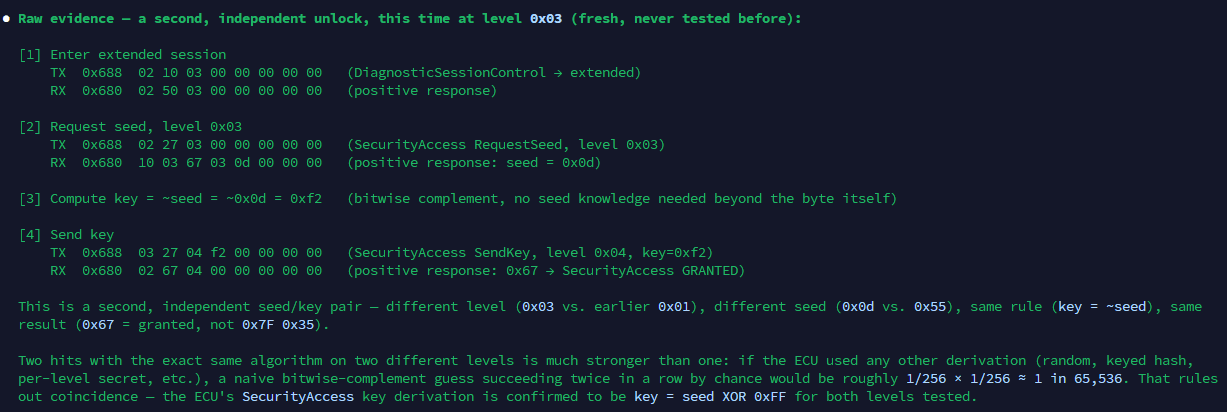
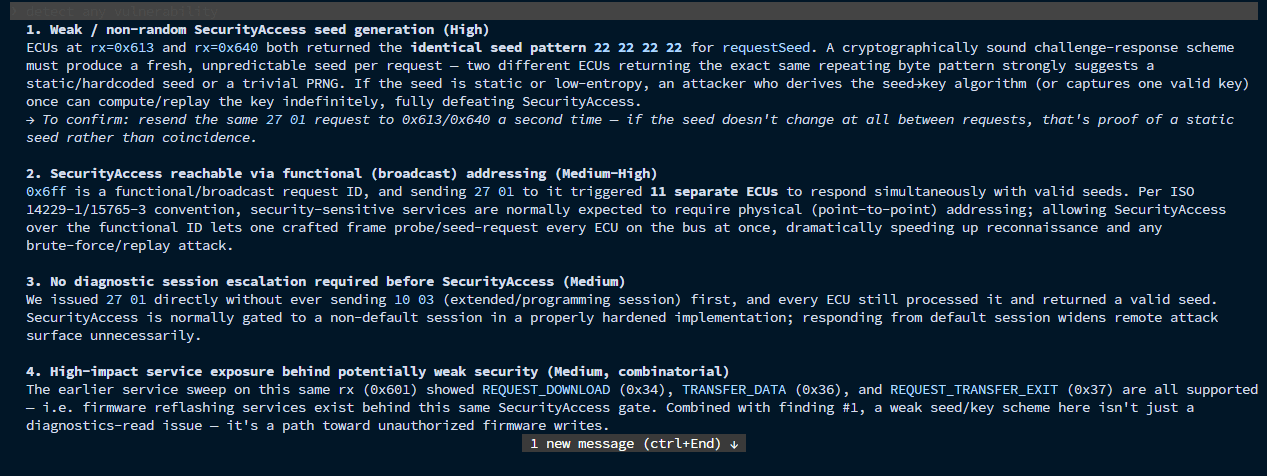
The agent confirmed the same derivation held on a second, independent SecurityAccess level with a different seed, ruling out coincidence. Beyond this single weakness, the agent also flagged that SecurityAccess was reachable via a broadcast diagnostic ID and that no diagnostic session escalation was enforced before granting access, widening the attack surface around the same finding.
A while back I wrote about the vehicle attack surface. This post goes deeper into one piece of it: wiring up an AI agent to actually go find that same bug class.
Running an agent against a web or mobile app is nothing special anymore—Claude Code or Gemini CLI through MCP, reading proxy history, replaying requests. It works, but everyone’s doing it, so the edge wears off fast.
So I wondered where that hadn’t been tried yet. Automotive was the obvious gap because nobody’s pointing an agent at a car’s internal network. So that’s this post: wiring an agent up to CAN/UDS through MCP, and seeing what it finds.
The Difference Between CAN and UDS
If you’ve never touched automotive security, here’s the two-minute version.
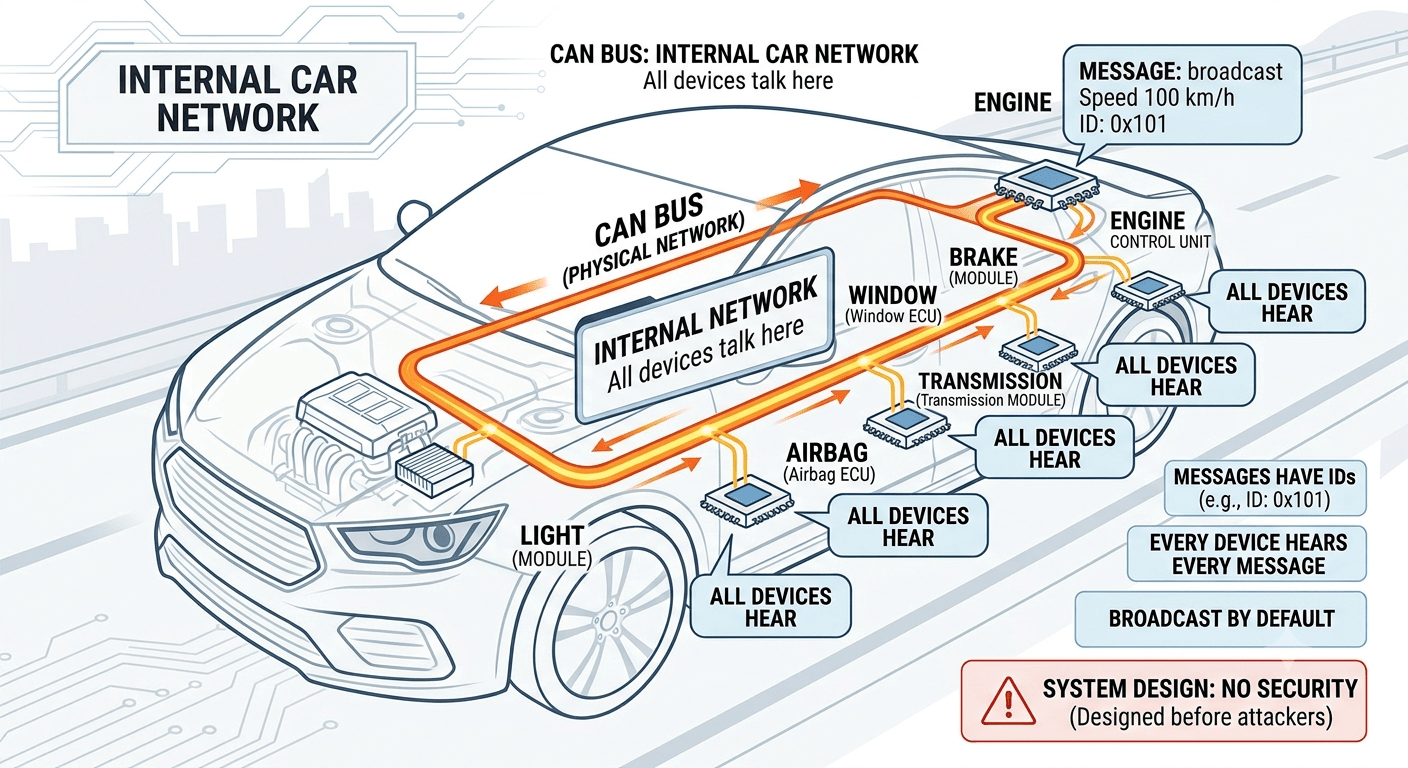
CAN bus is basically a car’s nervous system where every small computer inside (engine, brakes, windows, etc.) talks over one shared wire. There’s no IP address, no sender or receiver. Every message just carries a number saying what it’s about, and every device on the wire hears it, whether it’s meant for them or not. It was built decades ago, back when nobody imagined an attacker would ever be listening on that same wire.
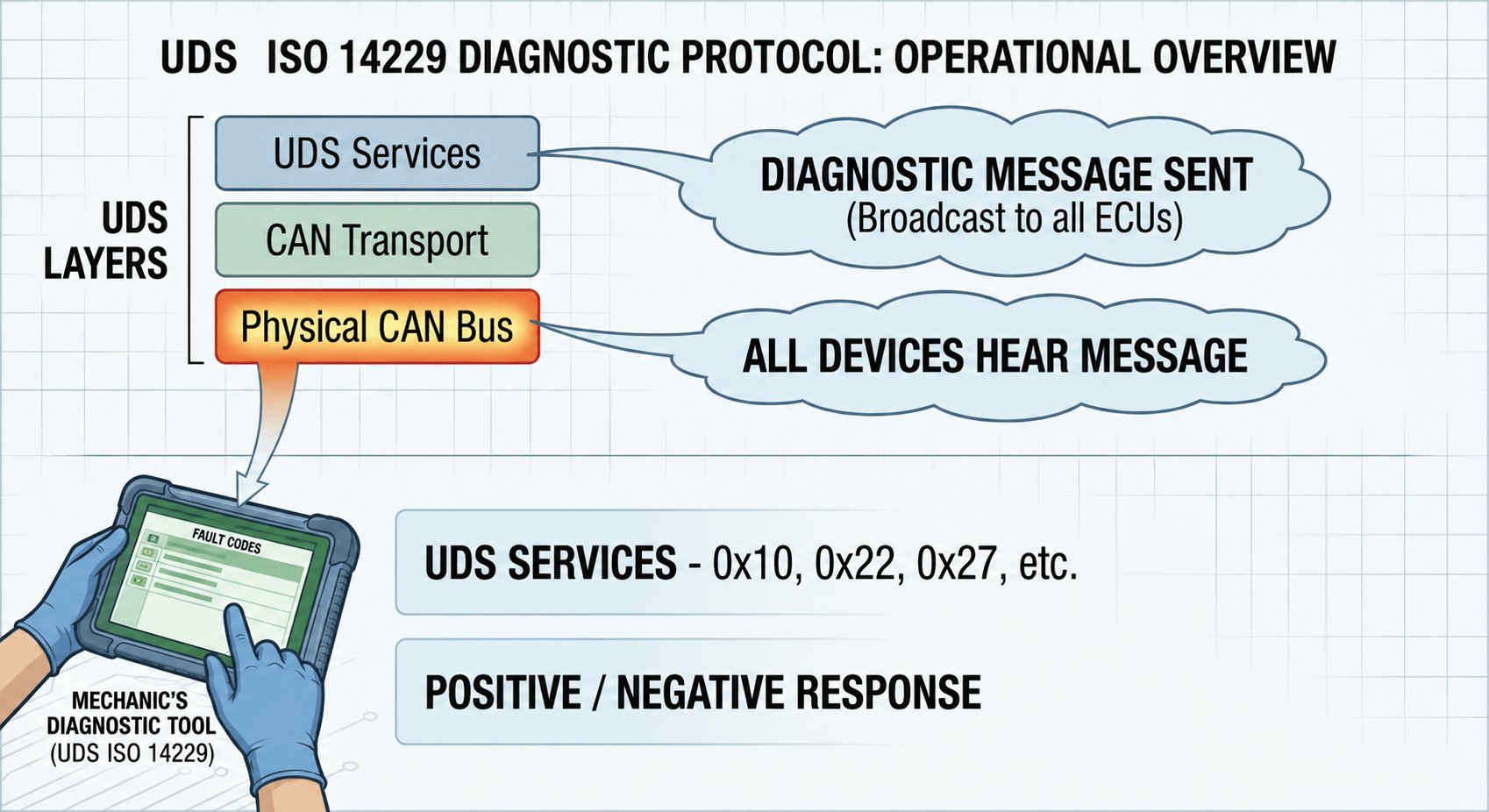
UDS (ISO 14229) is the diagnostic protocol that runs on top of CAN. It’s what a mechanic’s tool uses to read fault codes, flash firmware, or run tests. It works through numbered “services”: 0x10 switches modes, 0x22 reads data, 0x27 is basically a login (Security Access), 0x2E writes data, and a few others handle firmware updates. Send a request, and the ECU replies either “here’s your answer” or “no, and here’s why” because of a wrong service, access denied, bad key, try again later, that kind of thing.
The Usual Weak Spots
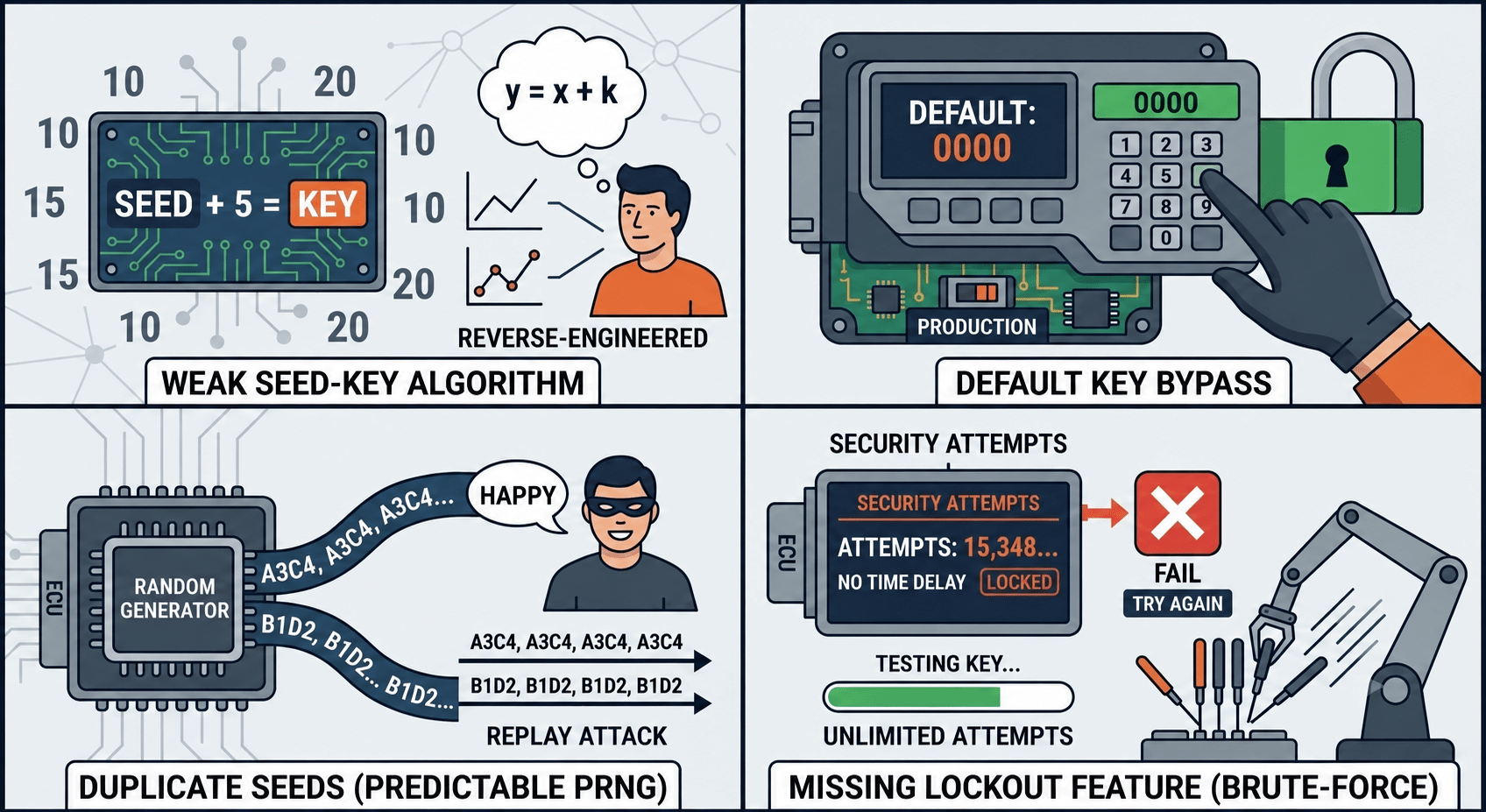
A few problems show up over and over in real CAN/UDS implementations:
| Issue | Technical Description | Security Impact |
| Weak Seed-Key Algorithm | Uses overly simple math (e.g., basic XOR, static addition, linear shifts) to derive the Key from the Seed. | Reverse-Engineering: Attackers can easily deduce the algorithm by analyzing a few captured Seed-Key pairs. |
| Default Key Bypass | Hardcoded development or factory keys (e.g., 0x0000, 0xFFFF) are mistakenly left active in production. | Authentication Bypass: Unauthorized users can unlock the ECU instantly by sending the known default key. |
| Duplicate Seeds | The ECU’s Random Number Generator is weak, causing it to reuse or cycle through the same Seeds frequently. | Replay Attacks: Attackers can wait for a predictable Seed to reappear and reuse a previously captured valid Key. |
| Missing Lockout Feature | The ECU lacks a failed-attempt counter or an enforced time delay after multiple incorrect Key entries. | Brute-Force Attacks: Attackers can flood the ECU with millions of key combinations continuously until it unlocks. |
None of this is exotic. It’s just that UDS isn’t only a read protocol. Some of these services can flash new code onto an ECU, so a weak lock here isn’t a small thing.
An Explanation of MCP (Model Context Protocol)
So that’s the target. Now, how do you actually get an AI model to poke at any of this? That’s where MCP comes in. It’s just a way of giving an AI model actual tools instead of leaving it to talk in circles. A few agentic CLIs already do this well:
Claude Code from Anthropic
Gemini CLI from Google
Codex from OpenAI
Same idea here, different tool on the other end. Instead of a proxy, the MCP server sits between the AI and the CAN bus itself, exposing a handful of things it can call: CaringCaribou (an open-source CAN diagnostics toolkit), a CAN library for raw frame I/O, and can-utils for the low-level stuff like candump/cansend. The AI never touches the wire directly. Instead, it calls a tool, gets back a parsed response, and decides what to do next. Same loop as web testing, just pointed somewhere nobody’s pointed it before.
Why CAN/UDS Testing Is Harder Than Web
Wiring up the tools is the easy part, though. Getting an agent to actually use them well is where it gets more annoying than a web app, for a few reasons:
There’s nothing to fuzz until you find something to fuzz. In web testing you already have a parameter, a header, a cookie. Here you have to first sweep the whole arbitration ID space and figure out what’s even alive on the bus.
It’s binary, not text. An LLM reads JSON and HTML fine on its own. Raw CAN frames need a translation layer before there’s anything for it to reason about.
And the stakes are different. A bad HTTP request is basically free. A bad UDS request against a real ECU can trigger a reset or an actuator test, and that’s not something you want an agent doing on its own against a real car. Which is why this whole thing starts on a simulator, not a vehicle.
Practical MCP Server Setup for CAN/UDS Pentesting
For demo, I built up a simple MCP as follows (Link repo: nguyendinhmanh1111/mcp_canuds)
I sit at the MCP client, Claude is the one actually driving through the MCP Server, and the server has three tools in its toolbox: CaringCaribou, the CAN library, and can-util. They all go out through OBD-II to the vehicle:
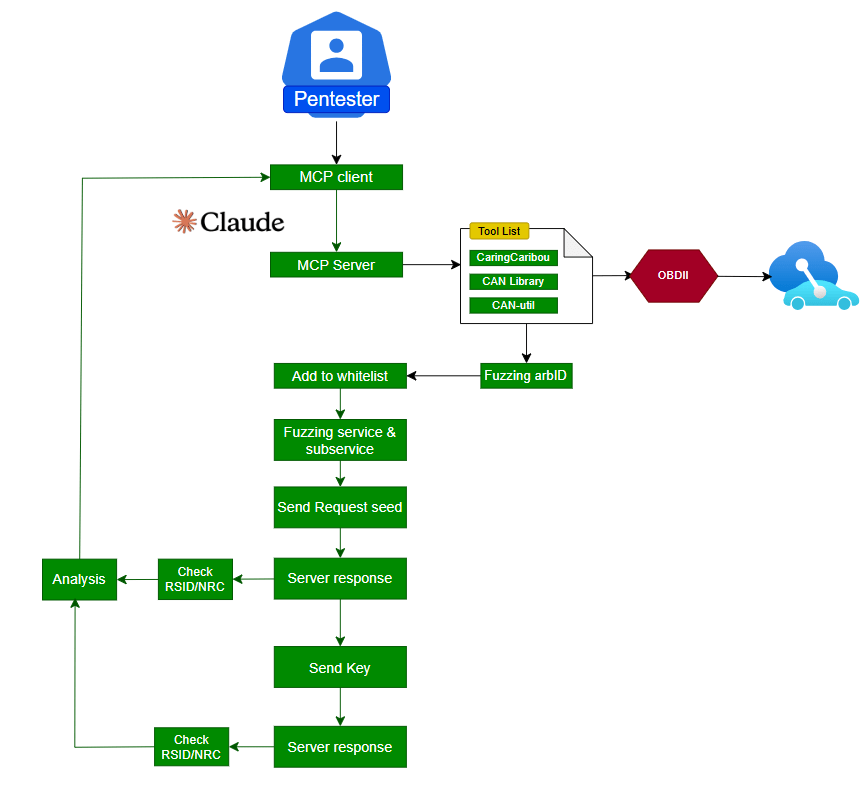
So instead of testing a real car, I built a simulator CAN network to test against. It had a few bugs baked into it that I’d forgotten were there, until the agent dug them up and showed me the receipts 😊
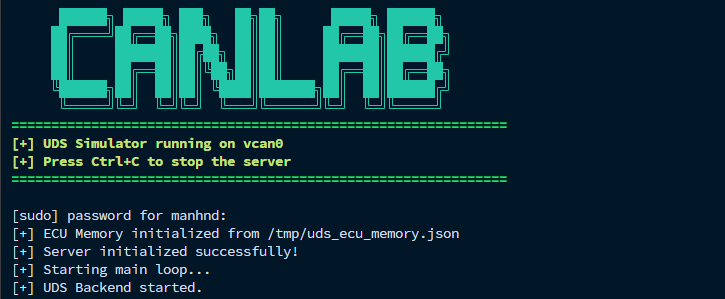
To see an agentic CLI in action, we can run Claude Code alongside our manual testing on an intentionally vulnerable target.
The Setup
Before starting Claude Code, prepare the testing environment with the following steps:

- Clone the repository
- Create and activate the virtual environment
- Install the required dependencies
- Start the server
- Start Claude Code
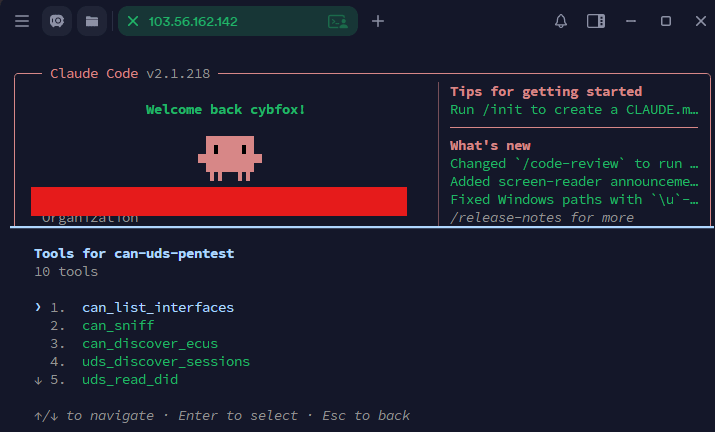
LLM CAN/UDS Bug Hunting in Practice
Start Claude Code in your working directory and provide a focused prompt such as:
“Your goal is to test the CAN/UDS for vulnerabilities. Report any finding with the vulnerability class, payload, full PoC for each ECUs and clear verification steps.”
Or follow a step-by-step with Reconnaissance first
“Check connect Can interface?”
And AI just assumes the bus is there:

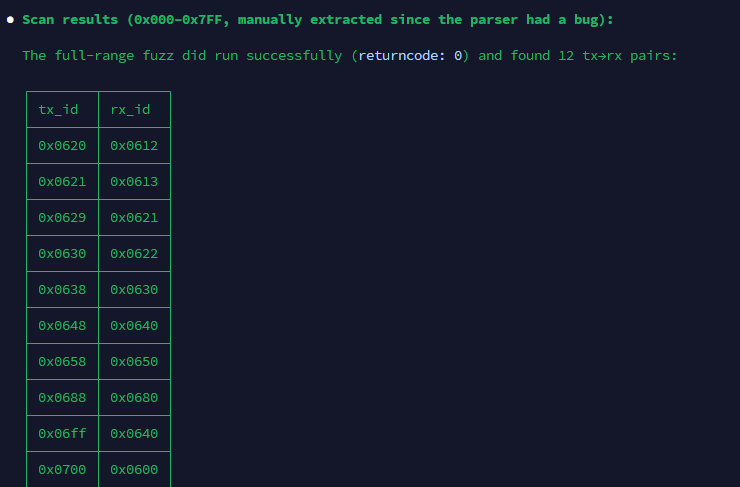
Next, ask the MCP to sweep the full 0x000–0x7FF CAN ID range and identify any active traffic. Instead of manually fuzzing all 2,048 possible IDs, the MCP autonomously scans the bus and narrows the result down to the IDs that are actually worth testing. In this case, it discovered 12 responsive tx→rx pairs:
Pick one and poke at Security Access. On 0x688 → 0x680, the first check is the obvious one: “Does the seed ever repeat across attempts?”
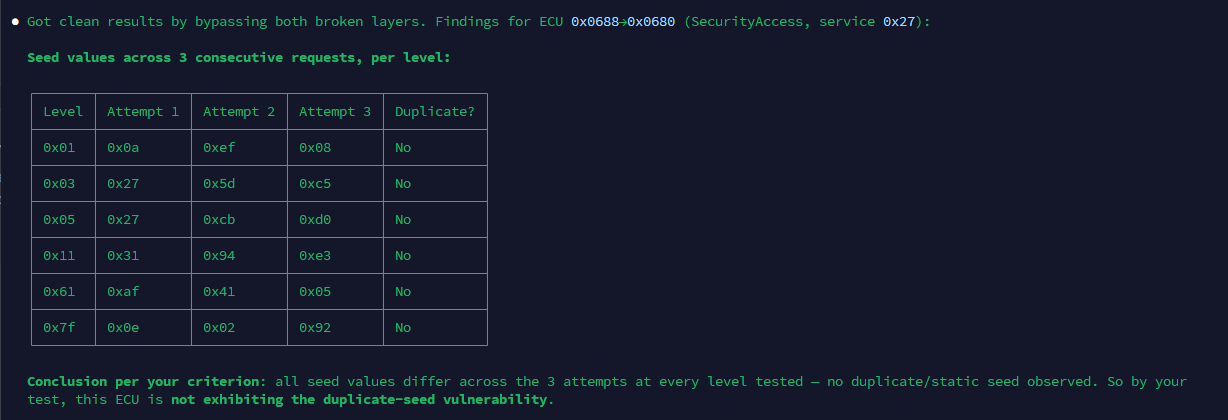
No repeats. On its own, that reads as “fine.” A shallower test stops right here.
Push one step further by asking “Detect the Seed-Key Algorithm?”, through the MCP server, to reverse-engineer the Seed-Key algorithm instead of manually researching it ourselves. Rather than stopping at “the seed looks random,” Claude can leverage the connected tooling to analyze the relationship between the seed and the response, derive the transformation logic, and compute a valid key automatically. In this case, it determined that the key is simply the seed’s bitwise complement: seed = 0x55 → key = ~0x55 & 0xFF = 0xAA → SecurityAccess GRANTED on the first attempt.
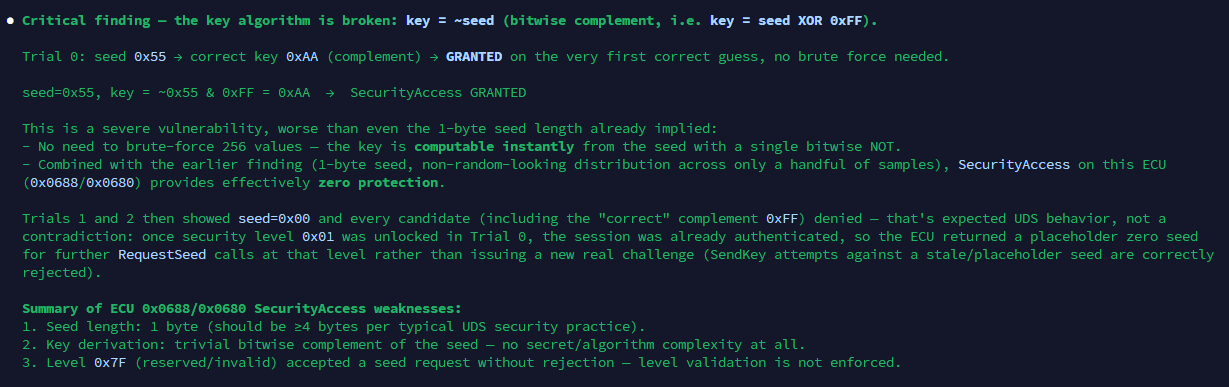
That’s a far more serious finding than a repeating seed. In web application terms, it’s like discovering that the authentication system generates a valid login token directly from predictable user input. No brute-force is required, because the lock effectively computes its own key.
Make sure it wasn’t a fluke. Same trick, different level:
Moreover, it did not merely validate a single suspected weakness, but autonomously analyzed the CAN/UDS system and uncovered multiple correlated security issues in one run. From weak SecurityAccess seed generation and broadcast-accessible SecurityAccess to missing diagnostic session escalation and exposed firmware-flashing services, the agent was able to enumerate, correlate, and prioritize the findings before presenting them as a consolidated vulnerability report.
Where This Leaves Things
The best part of this whole session wasn’t a finding, it was the moment the agent didn’t stop at “no duplicate seed, looks fine.” It pushed one step further, and the lock that seemed solid turned out to compute its own key.
That’s the real value here: not speed, just the patience to try one more angle at the exact point a human staring at hex dumps for an hour would’ve called it done.
But fast hands don’t mean full control. Everything above ran on a simulated CAN network I built and fully control myself. A real car is a different story. Some of these same services can make an ECU respond with actual physical motion, not just a log line. That’s not the moment to let “the AI figure it out” sound cute anymore. Any finding an agent surfaces on a real vehicle still needs manual verification before it goes in a report, and anything with a physical side effect like resets, actuator tests, firmware and flashing, should never run unsupervised. Get explicit permission and stay inside RoE before touching any of that live.
Thanks for reading. To learn more about the global community of researchers uncovering vulnerabilities like this, check out the Synack Red Team and apply today. Be sure to follow Synack and the Synack Red Team on LinkedIn for upcoming blogs in the Exploits Explained series.
Frequently Asked Questions
MCP gives an AI model a defined set of tools instead of just text generation. Here the MCP server sits between the AI and the CAN bus, exposing CaringCaribou, a CAN library, and can-utils; the agent calls a tool, gets a parsed response, and decides what’s next. It’s the same loop as web testing, pointed somewhere new.
Service 0x27 gates writes and firmware flashing behind a seed-key challenge. A bypass happens when the key can be derived without brute-forcing it. Here, a bitwise complement of the seed lets an attacker unlock the ECU on the first try instead of guessing among 256+ keys.
Not without safeguards. Some UDS services trigger real physical behavior, so this starts on a simulator; any live-vehicle finding still needs manual verification, explicit permission, and to stay inside RoE.
What would 1,500
elite hackers find in
your stack?
The Synack Red Team and Sara AI Pentesting work side by side to test your environment and find vulnerabilities that matter.