



When the Boot Files Talk: How an Open TFTP Directory Handed Attackers the Keys to the Kingdom
A Synack Red Team member discovered a cross-site scripting vulnerability in SAP Concur Open.

There’s a particular feeling in bug hunting that’s hard to describe—that moment when you pull on a single loose thread and the whole sweater starts to unravel. This was one of those moments.
I was midway through a routine engagement, running directory fuzzing across the target’s internal web infrastructure, when something caught my eye. An endpoint: /tftpboot/. Not a login panel. Not an API endpoint. A TFTP boot directory—served wide open over HTTP with directory listing fully enabled, no authentication required.
Most people would scroll past it. After all, TFTP directories serve device firmware during network booting. What’s the worst that could be in there? Boot configs? Maybe some kernel images?
As it turned out: everything. Absolutely everything.
What Is a TFTP Boot Directory?
For those who are unfamiliar, TFTP (Trivial File Transfer Protocol) is a lightweight protocol used in enterprise and data center environments to boot devices over the network. When a physical server or network appliance powers on without a local OS, it reaches out via TFTP to a provisioning server and downloads the files it needs to boot—things like boot loaders, compressed filesystem archives, configuration scripts, and firmware packages.
These files are supposed to live behind firewalls and on isolated management networks. They are absolutely not supposed to be reachable via an unauthenticated HTTP service—especially from a general-purpose network segment.
But here they were.
Pulling the Thread: Exploiting Open HTTP Directory Listings in Firmware
The directory listing revealed a tidy folder structure—device model names organized like a product catalog, each folder named after a distinct hardware platform. Multiple subdirectories were visible, each holding what appeared to be versioned boot packages, including files with the .keg extension—a proprietary archive format used for bootstrap packaging in this environment.
I downloaded one: bootstrap.keg. It was about as suspicious as a file named “definitely-not-your-secrets.zip,” and equally rewarding.
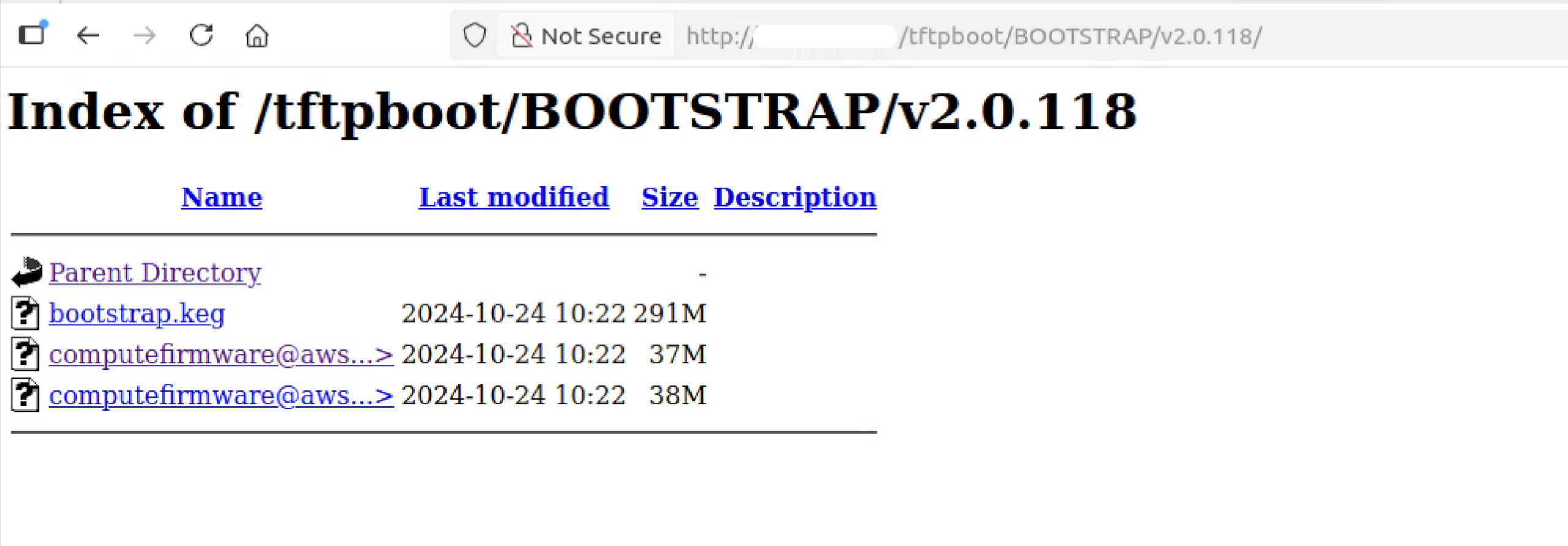
Figure 1. Open HTTP directory listing exposing /tftpboot/BOOTSTRAP/v2.0.118/ including a 291 MB bootstrap.keg firmware archive, freely downloadable without authentication.
Running binwalk against it—a tool that excels at peeling back compressed and nested firmware archives—I began extracting layer after layer of the embedded filesystem.

Figure 2. binwalk -e bootstrap.keg output—nested CPIO archives identified for bin/, service/, tar/, and tar/bootstrap.tar.gz, exposing a full multi-layer embedded filesystem structure.
First came a TAR archive. Inside that, a keys/ directory. And inside that, sitting completely unprotected:
keys/key-private.pem
A 2048-bit RSA private key. Exposed. Downloadable by anyone with a browser and a mildly curious disposition.
I kept digging.
RSA Keys and /etc/password Exposure
Nested deeper inside the bootstrap package was initramfs.cpio.gz—the initial RAM disk image, which is essentially a compressed snapshot of the full device filesystem unpacked into memory at boot time. Extracting it was like opening a safe that someone forgot to lock.
What was inside stopped me cold.
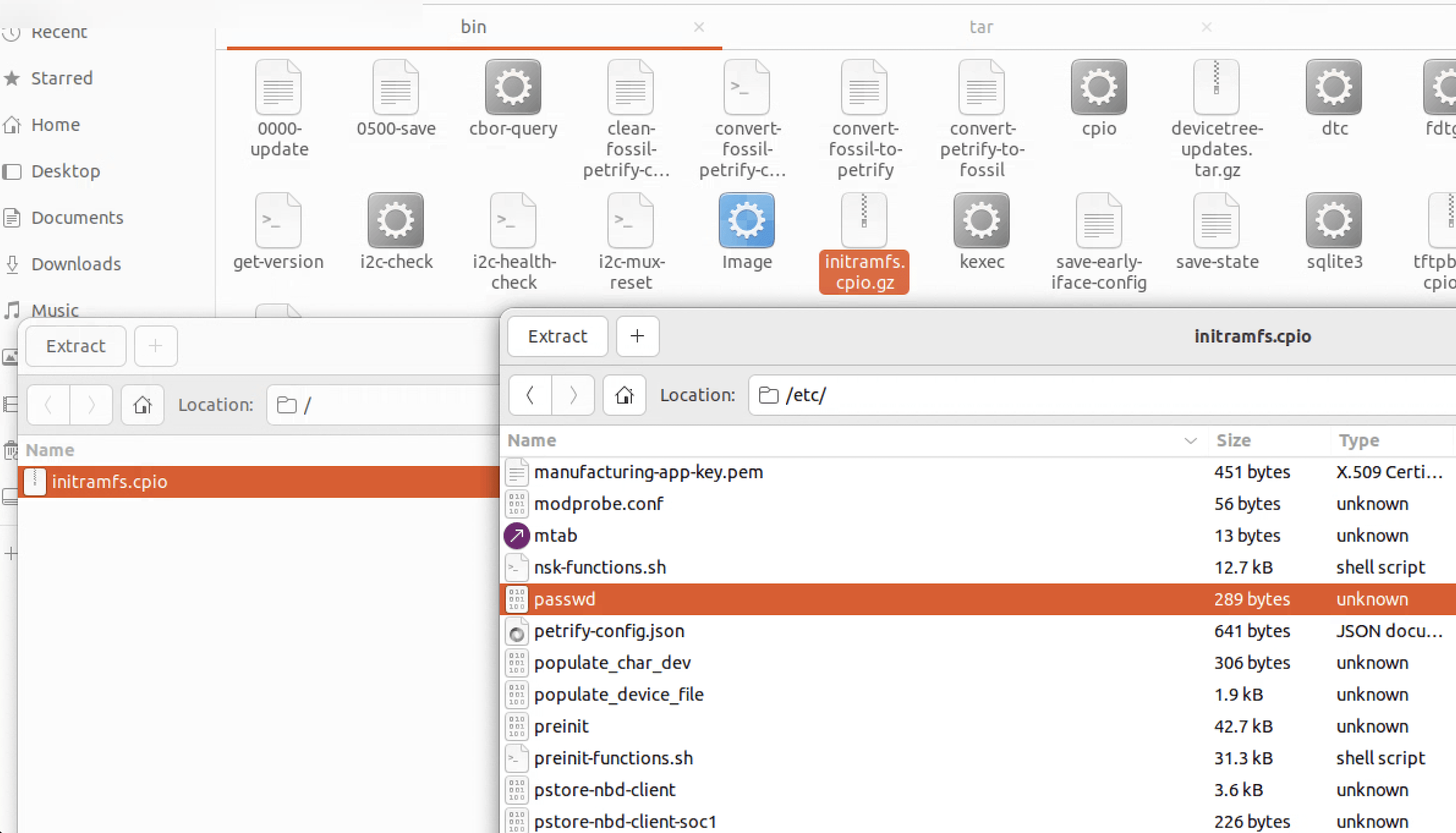
Figure 3. Extracted initramfs.cpio filesystem showing /etc/passwd alongside manufacturing-app-key.pem, configuration scripts, and other sensitive system files—all unprotected inside the firmware image.
/etc/passwd—the system user list. It provided a complete roadmap of every account on the device, including root—essential intelligence for a targeted attack.
/share/lua/5.3/ipmi-commands.lua—hardcoded admin credentials. This file managed IPMI (Intelligent Platform Management Interface) access provides the out-of-band management interface that gives administrators hardware-level control over servers, including power cycling, console access, and sensor monitoring. And right there, hardcoded at the top of the file:
— Snippet from ipmi-commands.lua
local user = “Admin”
local password = “Admin”
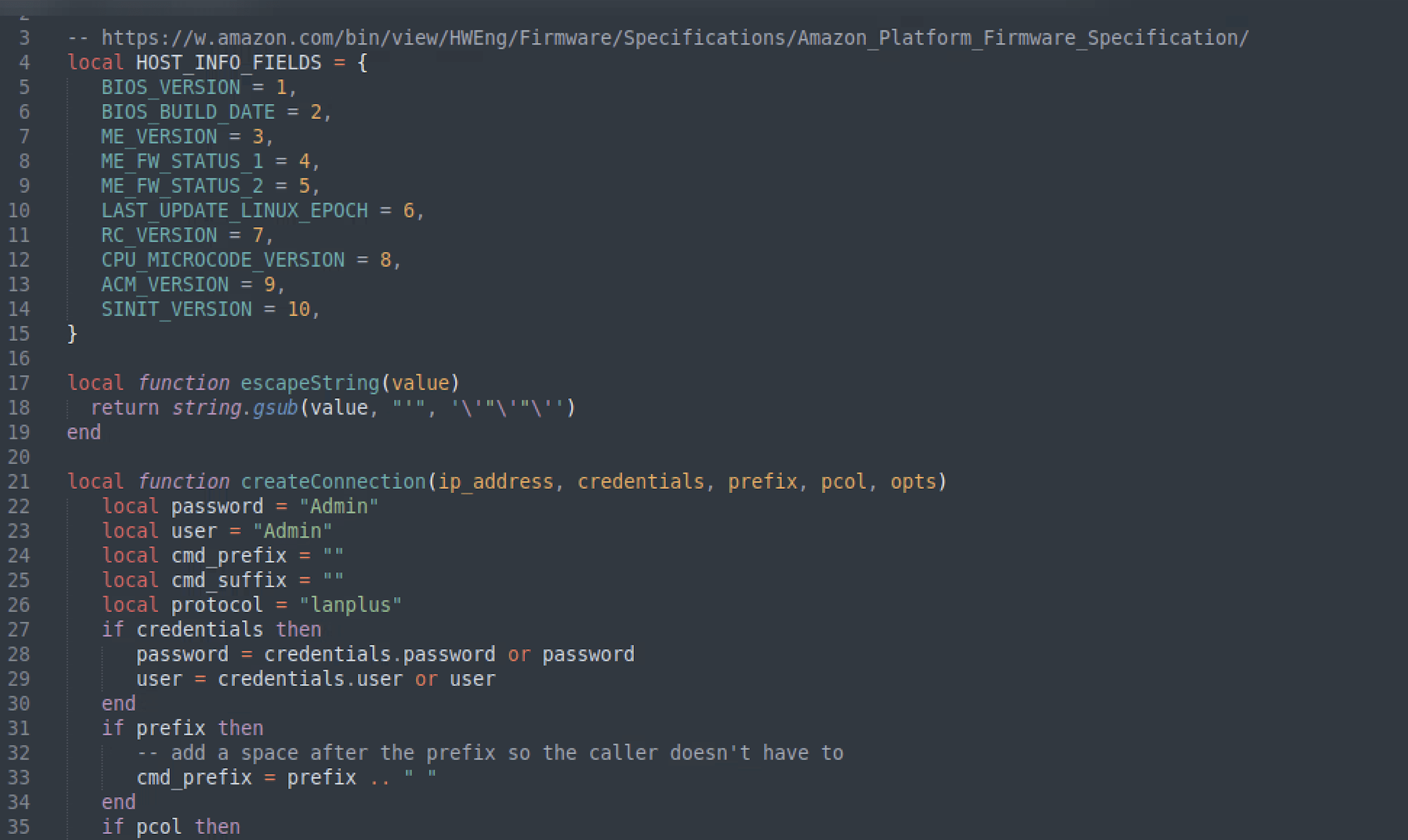
Figure 4. Hardcoded IPMI credentials in ipmi-commands.lua—local password = “Admin” and local user = “Admin” embedded as fallback defaults in production firmware shipped across multiple device models.
Admin / Admin. On the IPMI interface. In production firmware. Shipped across multiple device models.
To put this in concrete terms: IPMI access with admin credentials means an attacker can remotely power cycle hardware, access the system console before the OS even boots, modify boot order, dump memory, and in many cases pivot to the broader management network—all without ever touching the operating system layer. It’s the kind of access that makes traditional security controls irrelevant.
The Blast Radius of Systemic Firmware Misconfigurations
What started as a single exposed directory on one server turned out to be a systemic issue. Across multiple internal management servers on separate network segments, I found the same open directories, the same downloadable .keg files, the same hardcoded credentials—embedded in every firmware variant I examined.
The /tar/bootstrap/kegs/ directory even contained firmware packages for other device models entirely—meaning the exposure wasn’t just one product line. It was an entire fleet. Hardware platforms beyond the original target had their firmware sitting in the same open directory, waiting.
This is what makes chained misconfigurations so dangerous. No single issue here was catastrophic in isolation. Directory listing is a bad practice but not usually critical. A .keg file sounds exotic. An initramfs image seems arcane. But stacked together—open directory, downloadable firmware, unencrypted filesystem, hardcoded credentials, exposed private key—you have everything needed for persistent, hardware-level compromise of an enterprise fleet.
Common Causes of TFTP and Firmware Vulnerabilities
In my experience, these vulnerabilities share a common origin story: a tool or service that was never designed to face the internet ends up behind a misconfigured web server, and nobody notices because nobody is looking. TFTP servers are provisioning infrastructure—the assumption is that they’re isolated on internal management networks. The moment an HTTP server with directory listing enabled points at that same directory, the isolation assumption silently collapses.
Hardcoded credentials in firmware are a separate but equally common failure mode. They often survive for years because firmware update cycles are slow, QA processes don’t catch secrets in binary blobs, and developers assume nobody will ever extract and inspect the image. This assumption doesn’t hold when the firmware is sitting in an open directory.
5 Steps to Secure your TFTP Infrastructure
If your infrastructure includes TFTP provisioning—and in data centers, it almost certainly does—these steps are non-negotiable.
- Disable directory listing immediately. For Apache, add Options -Indexes to the relevant directory block. For Nginx, set autoindex off. There is no reason a provisioning directory should be browsable by a web client.
- Decouple TFTP from HTTP. The /tftpboot/ path should be served exclusively by a TFTP daemon to authorized management network clients — never by an HTTP server accessible from broader network segments.
- Audit your firmware for embedded secrets. Run binwalk on your own images. If you can extract a credential, so can an attacker. Tools like trufflehog can scan extracted filesystems for hardcoded secrets automatically.
- Rotate everything that was exposed. If credentials, keys, or certificates were present in accessible firmware, treat them as compromised. Rotate them. Now.
- Firewall the management plane. IPMI interfaces should be on isolated, authenticated management networks — never reachable from any path that a general-purpose attacker could walk.
The Loose Thread: Why Infrastructure Visibility is Critical for Security
What strikes me most about this finding is how invisible it was. No exploit, no CVE, no zero-day. Just a misconfigured web server and a file with a confusing extension that nobody thought to look at. The vulnerability wasn’t in the firmware itself — it was in the assumption that infrastructure files are somehow hidden by virtue of being technical.
They’re not. And when those boot files start talking, they have a lot to say.
This vulnerability was found on a Synack engagement. Reported, triaged, and remediated through the Synack Red Team program. To learn more, follow Synack and the Synack Red Team on LinkedIn.
Frequently Asked Questions
What is the primary risk of an open TFTP file-store exposed via HTTP?
An open TFTP directory allows unauthenticated users to download sensitive boot files, firmware archives, and configuration scripts. This can lead to the exposure of RSA private keys, system user lists (/etc/passwd), and hardcoded administrative credentials, providing a roadmap for full system compromise.
How do hardcoded IPMI credentials impact enterprise security?
Hardcoded credentials in the Intelligent Platform Management Interface (IPMI) allow an attacker to gain hardware-level control over servers. This includes the ability to remotely power cycle hardware, access the system console before the OS boots, and pivot to broader management networks, bypassing traditional operating system security controls.
Why is firmware analysis a critical part of a security audit?
Firmware often contains hidden secrets like hardcoded passwords or fallback credentials that developers assume will never be inspected. Firmware threats operate below the OS, staying invisible to security tools like EDR that only load after the boot process. This allows vulnerabilities to be exploited at the hardware-level control that effectively bypasses all traditional software security layers. Using tools like binwalk to extract and audit firmware filesystems can reveal these systemic vulnerabilities before they are exploited to compromise an entire fleet of devices.
What are the most immediate steps to secure a TFTP infrastructure?
The most critical steps include immediately disabling directory listings on web servers (e.g., Options -Indexes in Apache), decoupling TFTP services from HTTP access, and ensuring all IPMI interfaces are isolated on authenticated management networks. Additionally, any credentials or keys found in accessible firmware should be treated as compromised and rotated immediately.
About the Author
Sukesh Shetty is a seasoned cybersecurity professional with over 14 years of experience in penetration testing, security architecture, and DevSecOps across various sectors, including fintech and e-commerce. His deep technical expertise includes securing cloud environments and managing complex risk assessments aligned with global frameworks such as PCI DSS and ISO 27001. A distinguished researcher in the field, Sukesh has been inducted into the elite Synack Red Team Acropolis program in recognition of his expertise and contributions to the security community.
What would 1,500
elite hackers find in
your stack?
The Synack Red Team and Sara AI Pentesting work side by side to test your environment and find vulnerabilities that matter.